








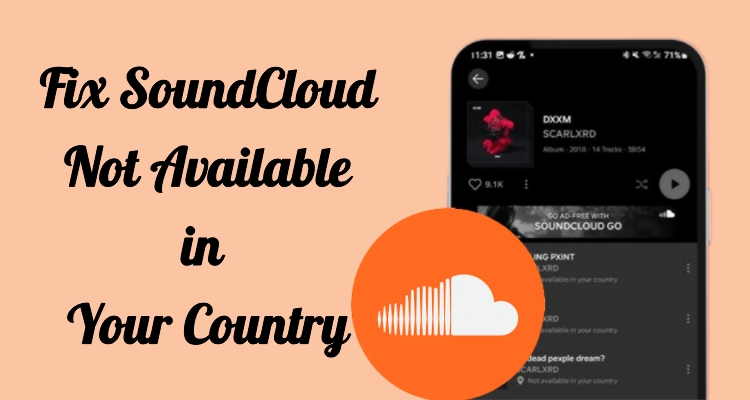
SoundCloud is one of the most popular music streaming platforms, loved for its vast collection of independent tracks, remixes, and podcasts from creators worldwide. However, you may sometimes encounter the SoundCloud not available in your country issue. In this guide, we'll explain the causes behind this issue and provide practical solutions to fix it, so you can get back to enjoying your favorite audio content without interruptions.
- Part 1. Why Does SoundCloud Say Not Available in Your Country?
- Part 2. How to Fix SoundCloud Not Available in Your Country
- Part 3. How to Bypass SoundCloud Not Available in Your Country
- Part 4. Conclusion
Part 1. Why Does SoundCloud Say Not Available in Your Country?
When you try to open SoundCloud and see the not available in your country message, it usually means the platform has restricted access based on your location. This message can appear on both the app and browser versions. Below are the main reasons why SoundCloud may show this error.
- Reason 1. Licensing restrictions limit content availability across specific countries.
- Reason 2. Copyright agreements differ depending on regional music distribution laws.
- Reason 3. Artist or label blocks playback in selected geographic locations.
- Reason 4. IP address detection identifies your location and restricts access.
- Reason 5. Government regulations limit streaming services in certain regions.
- Reason 6. Temporary server issues may incorrectly trigger location-based restrictions.
Part 2. How to Fix SoundCloud Not Available in Your Country
If the issue is caused by a temporary glitch or server-related error, you may be able to resolve it quickly using the following three solutions.
Method 1. Using the Mobile App
Sometimes the issue only affects browser access, while the mobile app works normally. Switching to the app can bypass minor location or cache-related issues and provide a smoother experience when streaming music.
Step 1. Get the SoundCloud application from your phone's app marketplace.
Step 2. Complete the installation and launch it on your device.
Step 3. Sign in with your SoundCloud account details.
Step 4. Search for the track or content you want to play and check if the playback works without the restriction message.
Method 2. Clear Browser Cookies
Browsers store cookies and cached data, which may include outdated location information. Clearing this data can reset your connection and remove errors that trigger the Soundcloud not available in your country issue.
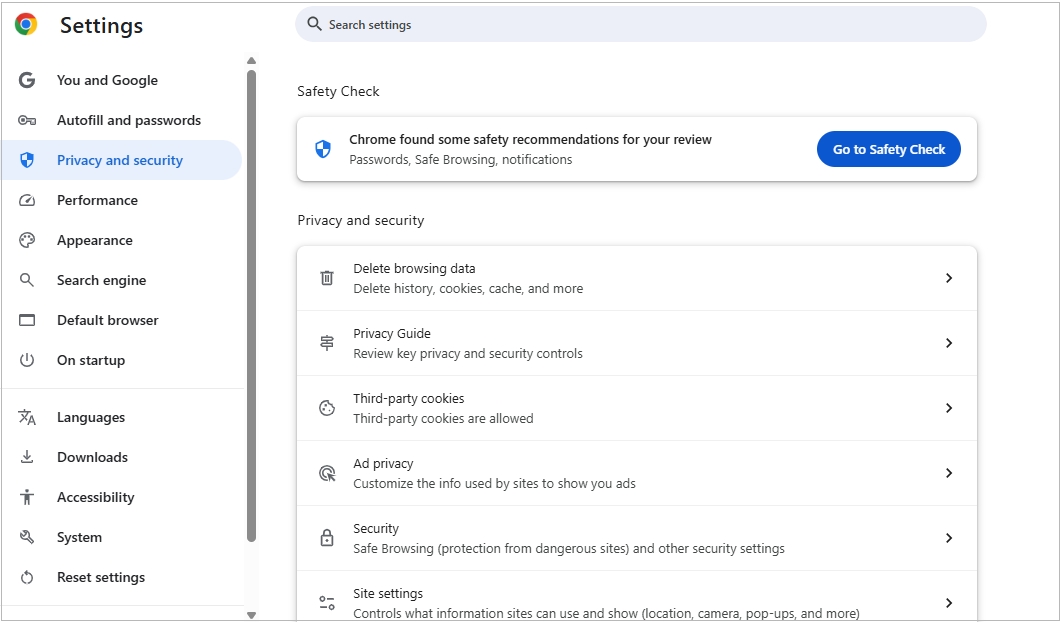
Step 1. Open your browser settings menu.
Step 2. Locate the Privacy and security section.
Step 3. Select the Delete browsing data option to clear all cookies and cached data.
Step 4. Visit SoundCloud again and test if the issue is resolved.
Method 3. Update the Soundcloud
Using an outdated app or browser can cause compatibility problems and unexpected errors. Keeping everything up to date ensures better performance and may automatically fix location-related bugs.
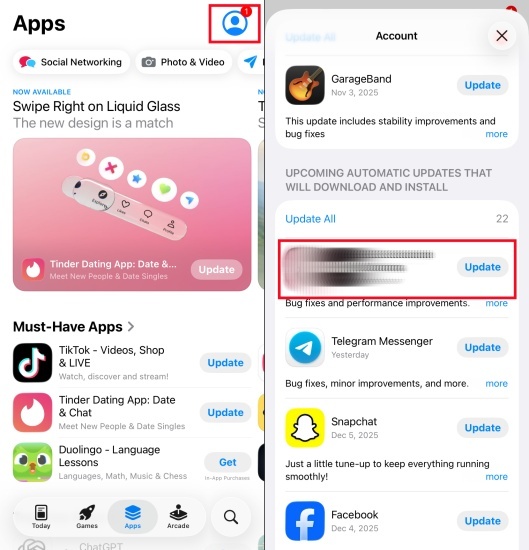
Step 1. Open your app store or browser settings
Step 2. Search for available updates for SoundCloud.
Step 3. Tap Update if a newer version is available.
Step 4. Wait for the installation to complete and relaunch SoundCloud and check if access is restored.
Part 3. How to Bypass Not Available in Your Country SoundCloud
Sometimes the issue is due to strict regional limitations that cannot be fixed with simple troubleshooting. In such cases, you can use certain tools to bypass these restrictions and access SoundCloud content from another virtual location. Below are three effective methods.
Method 1. Fake SoundCloud Location Using a Proxy Service
A proxy server works by routing your internet connection through a different location, masking your original IP address. This makes it appear as if you are accessing SoundCloud from a supported country.
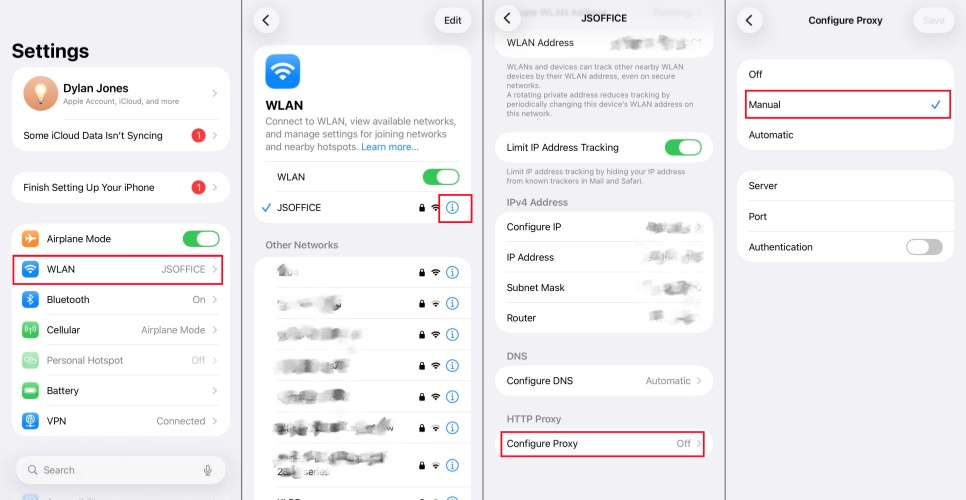
Step 1. Create an account with a reliable proxy provider and verify your registration.
Step 2. Copy the proxy details, including the server address, port, username, and password.
Step 3. Open your device's Wi-Fi settings and access the network you are currently connected to.
Step 4. Locate the Configuration Proxy settings section and switch it to Manual configuration.
Step 5. Enter the proxy server information along with your login credentials, then save the setup.
Step 6. Launch SoundCloud and start browsing content as if you were in the selected region.
Method 2. Fake SoundCloud Location with a VPN
A VPN (Virtual Private Network) is one of the most effective ways to bypass geo-restrictions. It encrypts your connection and routes it through servers in different countries, allowing you to access restricted content securely.
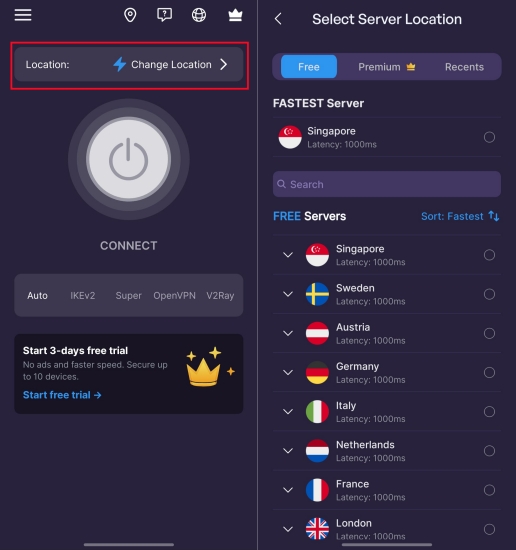
Step 1. Get a reliable VPN app from the App Store and install it on your device.
Step 2. Run the SoundCloud app and sign in with your account and password.
Step 3. Pick a server located in a region where SoundCloud access is supported.
Step 4. Tap Connect to link the server and wait for confirmation.
Step 5. Open SoundCloud and start streaming without restrictions.
Method 3. Fake SoundCloud Location via MagFone Location Changer
MagFone Location Changer is a desktop tool designed to simulate GPS movement on your mobile device without requiring jailbreak or root access. It lets you instantly modify your virtual location, making apps like SoundCloud detect you in a different region. With features like route simulation and joystick control, you can mimic real movement patterns. Here's how to change location on the SoundCloud app using MagFone Location Changer.

MagFone Location Changer
Easily change your GPS location on iOS and Android devices to anywhere with one click, while not requiring root or jailbreaking!
Step 1 Install and Set Up MagFone Program

Download MagFone Location Changer on your computer and complete the installation. Open the MagFone program, then connect your smartphone via USB. After the device is recognized, choose the location-modifying mode to proceed.
Step 2 Set Available Locations on SoundCloud

Use the built-in map to search for a country where SoundCloud access is unrestricted. Select the spot where SoundCloud is available and switch your location. Apply the changes, then open SoundCloud on your phone to access content as if you were in that region.
Part 4. Conclusion
Encountering the SoundCloud not available in your country issue can be frustrating, especially for music lovers who rely on the platform daily. Fortunately, the issue is often fixable through simple troubleshooting or by using tools like proxies and VPNs. By understanding the reasons behind the restriction and applying the right solution, you can regain access and continue exploring a world of music without limits.

Olivia Wood
Editor in chief




