








Pokemon GO players are always chasing smarter ways to explore the game beyond physical limits, and tools like PoGo Wizard have quickly gained attention for doing exactly that. From teleporting across continents to farming rare Pokémon effortlessly, this tool promises a new style of gameplay. But behind the hype, questions arise about safety, legitimacy, and real usability. Before jumping in, it's worth unpacking what PoGo Wizard Pokemon GO really offers and whether it truly delivers a seamless experience.

- Part 1. What Is PoGo Wizard?
- Part 2. Is PoGo Wizard Safe/Free/Legit?
- Part 3. How to Download PoGo Wizard for Pokemon GO [iOS Only]
- Part 4. Best Alternative: PoGo Wizard vs. Magfone Location Changer
- Part 5. Conclusion
Part 1. What Is PoGo Wizard?
PoGo Wizard is a location-spoofing tool designed for Pokémon GO players, allowing virtual movement and enhanced gameplay features. Below are its three main features explained clearly for better understanding.

1. GPS Joystick Control
Users can move their in-game character smoothly using an on-screen joystick, offering precise navigation without physically walking in real environments.
2. Teleport Anywhere Instantly
PoGo Wizard allows instant teleportation to any location worldwide using coordinates or map selection, helping players access region-exclusive Pokémon quickly.
3. Custom Route Planning
Players can design personalized walking routes with adjustable speeds, simulating natural movement patterns to make in-game actions appear more realistic.
Part 2. Is PoGo Wizard Safe/Free/Legit?
Before downloading PoGo Wizard, let's check its safety, pricing, and legitimacy first.
Is PoGo Wizard Safe?
PoGo Wizard is safe to download and install on your phone. However, account safety is a different concern. Since it modifies gameplay behavior and interacts with Pokémon GO systems, there is always a risk of detection and ban.

Reddit Comment on PoGo Wizard
Is PoGo Wizard Free?
PoGo Wizard is not free to use. Subscription plans are available at $14.95 per month, $29.95 per quarter, and $69.95 per year.
Is PoGo Wizard Legit?
PoGo Wizard is a functional third-party tool that provides features like GPS spoofing and gameplay enhancements as described. However, it is not officially supported by Niantic, the developer of Pokémon GO.
Part 3. How to Download PoGo Wizard for Pokemon GO [iOS Only]
PoGo Wizard is only available for iOS devices, as the download process requires an Apple ID. If you decide to use PoGo Wizard to play Pokémon GO, follow the step-by-step instructions below to download and install it on your device.

Step 1. Visit the official PoGo Wizard website and purchase a subscription plan.
Step 2. Download the desktop application on your Windows or Mac computer.
Step 3. Connect your Android or iOS device using a USB cable.
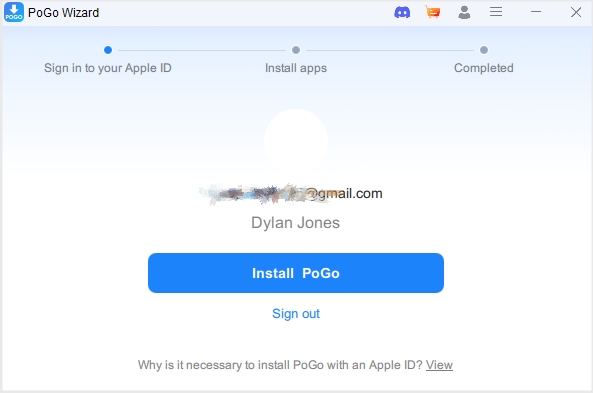
Step 4. Sign in with your Apple ID credentials and click Install PoGo.
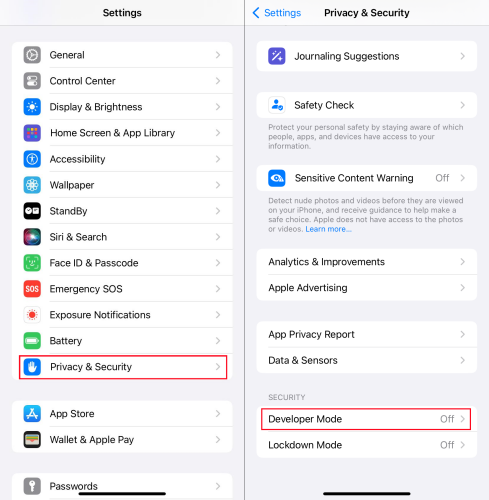
Step 5. Enable Developer Mode or USB Debugging, depending on your device.
Step 6. Install the modified Pokémon GO app provided by the software.
Part 4. Best Alternative: PoGo Wizard vs. Magfone Location Changer
While PoGo Wizard offers powerful spoofing features, many users explore alternatives that provide safer, more stable, and officially compatible location-changing experiences.
01Pros and Cons of PoGo Wizard
Here's a quick overview of pogo wizard advantages and drawbacks based on real usage experiences and performance observations.
 Pros
Pros- Advanced spoofing features available;
- Fixes common location errors;
- Supports route customization;
- Enhances gameplay efficiency.

- Need Apple ID credentials;
- Requires modified game app;
- Risk of account bans;
- Paid subscription required;
- Occasional stability issues.
02PoGo Wizard vs. Magfone Location Changer
Comparing these two tools helps users decide which solution better suits their gameplay needs and safety preferences.
| Feature | PoGo Wizard | Magfone Location Changer |
|---|---|---|
| App Type | Modified Pokémon GO | In-game app |
| Pricing | $14.95/Month | $9.95/Month |
| Ease of Use | Moderate complexity | Beginner-friendly |
| Device Support | iOS Only | iOS & Android |
| Requirements | Apple ID | / |
MagFone Location Changer stands out as a safer option for players who want location spoofing without compromising account safety. Unlike pogo wizard, it doesn't require installing a modified version of Pokémon GO and an Apple ID, significantly reducing detection risks. Its cleaner interface, smoother performance, lower price, and higher compatibility make it a preferred choice for both beginners and experienced users seeking consistent results.
03How to Use Magfone Location Changer
Using this alternative tool is straightforward and focuses on simplicity while still delivering powerful GPS control features for Pokémon GO players.

MagFone Location Changer
Easily change your GPS location on iOS and Android devices to anywhere with one click, while not requiring root or jailbreaking!
Step 1 Install and Set Up the Program

Download Magfone Location Changer from its official site onto your computer. Install the software, connect your smartphone via cable, and launch the program. Follow the on-screen instructions to enable developer settings and prepare your device for location modification.
Step 2 Modify Your GPS Location

Open the map interface within the program and select a destination by entering coordinates or placing a marker. Click the button to activate the location change instantly. Once applied, your device will reflect the new GPS position, allowing access to global Pokémon events.
Part 5. Conclusion
PoGo Wizard delivers powerful spoofing capabilities for Pokémon GO enthusiasts. However, its reliance on modified apps introduces risks that cannot be ignored. While it remains a popular choice, alternatives like Magfone Location Changer provide safer and more stable solutions.

Edgar Davis
Editor in chief





