








Changing your Samsung phone's location information can offer numerous conveniences, as most apps nowadays access your smartphone's location to provide various services. For example, Google Maps accesses geolocation information to provide real-time navigation. However, for a variety of reasons, you may want to change or hide your location information on your Samsung phone. This guide will discuss how to change location on Samsung phone and the different methods you can use. These methods will help you hide your real location and easily access geo-restricted content.
- Part 1. How Can I Change My Samsung Phone Location?
- Part 2. How to Change Location on Samsung Phone (No Root)
- Part 3. How to Change Country or Region on Samsung Phone
- Part 4. Conclusion
Part 1. How Can I Change My Samsung Phone Location?
You can change your location on your Samsung phone, including Samsung phone location and Samsung account region. Whatever your aim is, there are multiple ways to help you get it done. However, each method has different applicable needs, operation steps, and actual results. In the following sections, we will discuss about differences between GPS spoofing and Samsung account change, as well as, which is the best way to change location on the Samsung phone.
Differences between GPS Spoofing and Samsung Account Change
GPS spoofing involves altering the phone's latitude and longitude coordinates to allow location-based apps to identify a virtual location; while changing a Samsung account changes the account's geographic location, unlocking Samsung services only in the corresponding region.
| Feature | GPS Spoofing | Samsung Account Change |
|---|---|---|
| Modify Object | Mobile phone GPS module | Samsung account region information |
| Affects | Maps, games, tracking apps | Samsung ecosystem services |
| Use | Fake location in apps | Unlock Samsung services |
Comparison of Ways to Change Location on Samsung Phone
There are several ways to change the location on a Samsung phone. And this comparison table will let you know the differences of each way. Afterward, you can choose the appropriate method based on your specific needs.
| Quick Guide | Compatibility | Change GPS location | Change to Anywhere | Ease of Use | Ratings |
|---|---|---|---|---|---|
| Magfone Location Changer | iOS & Android | Yes | Yes | Easy | ⭐⭐⭐⭐⭐ |
| Fake GPS Location | Android | Yes | Yes | Medium | ⭐⭐⭐⭐ |
| VPN Services | iOS & Android | No | No | Easy | ⭐⭐⭐ |
Part 2. How to Change Location on Samsung Phone (No Root)
Whether you want to change your location information to play location-based games or need to change your location on social media, don't worry, there are several methods available to suit your needs. The following will introduce the detailed steps for changing your location on a Samsung phone.
Method 1. Change Location on Samsung Phone via Location Changer
MagFone Location Changer makes it easy to change your location on your Samsung phone. This practical GPS location spoofing tool is designed for iOS and Android devices. It allows you to change your location to anywhere in the world without rooting, which meets the needs of your games, social media platforms, or location-based applications. Follow the steps below to use MagFone Location Changer to change your Samsung phone's location.

MagFone Location Changer
Easily change your GPS location on your Samsung phone to anywhere with one click, while not requiring root!
Step 1 Connect Samsung Phone and Run MagFone Software

Download and install MagFone Location Changer on your computer, then run the program and connect your Samsung phone to the computer via a USB cable. Turn on Developer Mode on your device and select a location simulation mode.
Step 2 Start to Change Location on Your Samsung Phone

Select a location on the map, or enter an address in the search bar. Then click the Start Modifying button to change your Samsung phone location to the location you've selected.
Method 2. Change Location on Samsung Phone via Fake GPS Location
Sometimes, you can also change the location of your Samsung phone using a virtual GPS spoofing app for Android. Fake GPS Location is free to download and install from the Google Play Store. It can help Samsung users change their location, but its functionality is relatively limited. You can try using this tool to change the location of your Samsung phone by following the steps below.
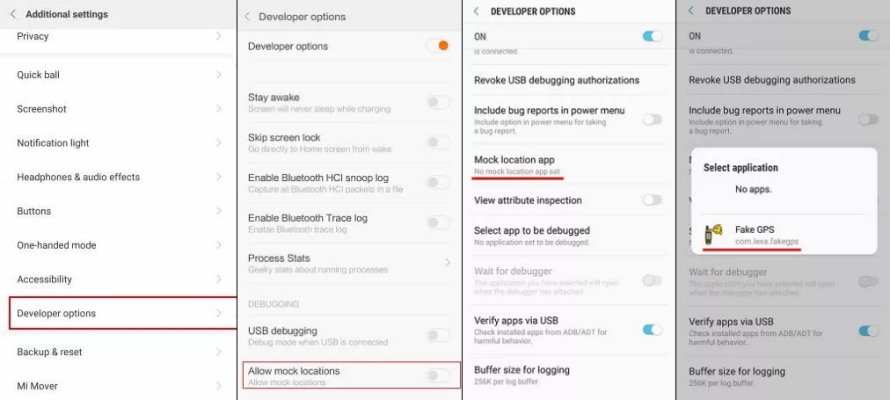
Step 1. Download the Fake GPS Location app on your Samsung phone.
Step 2. Go to Settings, then turn on Developer Mode.
Step 3. Tap Select Mock Location App.
Step 4. Select Fake GPS Location to change your device's location.
Method 3. Change Location on Samsung Phone via VPN Services
In addition to using a location spoofing tool, you can use a VPN service to change your location on Samsung device. But this cannot change the GPS location on your Samsung device. For changing your IP address only, using a VPN service to change your location on your Samsung phone is an ideal option, which enables you to access some geo-restricted content and apps.
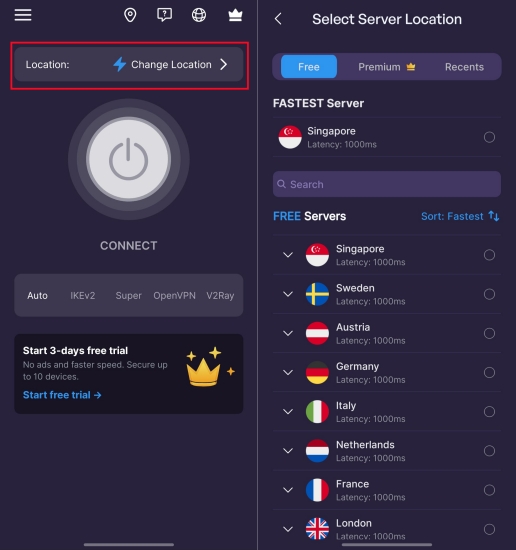
Step 1. Download and install a VPN service.
Step 2. Run the application and allow VPN configuration settings.
Step 3. Select an available server location.
Step 4. Tap the connect button to change the Samsung phone's IP address.
Part 3. How to Change Country or Region on Samsung Phone
If you want to change your region on your Samsung account, simply visit account.samsung.com to change your account's country or region. This method requires no technical knowledge or expertise, allowing you to download apps that are inaccessible in your current country or region. However, please note that after changing your country or region, you must wait 180 days to revert to the original place or change to another country or region. The specific steps will be explained below.
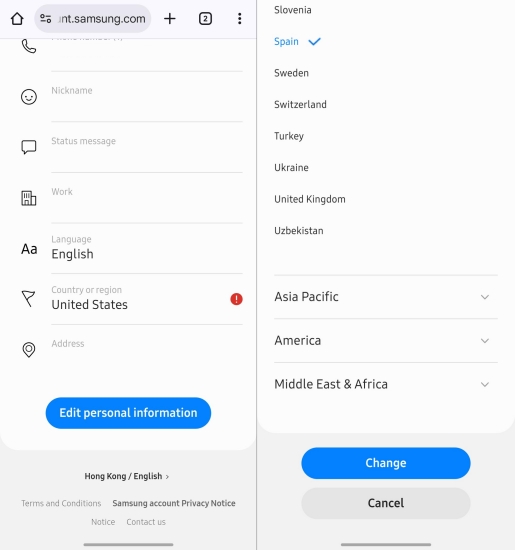
Step 1. Go to account.samsung.com and log into your account.
Step 2. Tap Profile > Edit personal information > Country or region.
Step 3. Select the desired region and country, then tap Change.
Step 4. Read the information provided on screen, then tap Change.
Part 4. Conclusion
You can change your location on your Samsung phone in several ways, whether it's changing your GPS or IP location. While there are multiple methods to help you change location on Samsung phone, a professional location changing tool such as MagFone Location Changer is highly recommended. With this tool, you can easily change your Samsung phone's location to anywhere in the world, providing accurate location information for everyday needs.

Edgar Davis
Editor in chief




