








Looking for a way to bypass iCloud Activation Lock on your iPhone, iPad, or Mac? iRemove software is a popular choice among users who need to regain access to their locked Apple devices. With thousands of reported successes, this tool can be effective, but it also comes with limitations. In this guide, we'll break down everything you need to know about iRemove Tools, including its features, supported devices, download options, and the alternative that offers a more permanent solution. Let's dive in.

- Part 1. What Is iRemove Tool?
- Part 2. How to Download & Use iRemove Tools for iCloud Unlock
- Part 3. Does iRemove Tools Work for iCloud Bypass?
- Part 4. Best Alternative: MagFone vs iRemove
- Part 5. Conclusion
Part 1. What Is iRemove Tool?
iRemove Tools is a collection of utilities mainly developed to bypass iCloud Activation Lock. Besides, iRemove Tools also includes services like removing MDM, bypassing the Hello Screen passcode, and removing the passcode on iPhone or iPad. From the table below, you can get a general idea of iRemove Tools.
| Main Features | iCloud Lock Bypass | MDM Lock Bypass | Lock Screen Passcode Bypass |
|---|---|---|---|
| Supported Devices | iPhone, iPad, Mac | All iPhones and iPads | iPhone SE 2, X series up to iPhone 11 Pro Max iPad (8, 9 gen) iPad Air (3rd gen) |
| Supported iOS Versions | iOS 12 to iOS 26.1 | Up to iOS 18.5 | iOS 18 to iOS 26 |
| Price | $4.99 to $190 Per Device | Start from $44.99 | Start from $30 |
| Success Rate | 80% | 70% | 70% |
If you have searched for iRemove Tools on the internet, you must have seen many users have reported success with the software. Does iRemove Tools really work for iCloud Activation Lock bypassing and deserve payment? Go through this review, and you'll get the answer.
Part 2. How to Download & Use iRemove Tools for iCloud Unlock
iRemove Tools is not a single program that works with all iOS versions and Apple device models. It offers different download package for different iDevice model. In this section, we will show you how to choose and download the appropriate iRemove Tools package for your device, and use it to remove iCloud Activation Lock.
Step 1. Download iRemove Tools by Device Model
Since iRemove Tools offers different versions for specific iPhone and iPad models, you need to download the corresponding iRemove Tools package for your device. Below, you can quickly find which version to download. Just visit the link and download iRemove Tools from iRemove's website.
| Supported Device | iOS Version | Support Operating System | Download Page |
|---|---|---|---|
| iPhone 4, 4s | iOS 7 | Only Windows | Visit |
| iPad 2 | iOS 7 & iOS 10 | Only Windows | Visit |
| iPhone 5 to iPhone 16 Pro Max | iOS 12 to iOS 26 | Windows & Mac | Visit |
| iPad 5 to latest model | iOS 12 to iOS 26 | Windows & Mac | Visit |
Step 2. Use iRemove Tools to Bypass Activation Lock
Once you've downloaded iRemove Tools, the next step is to use it to bypass iCloud Activation Lock. Though the version you download differs, the operation to use iRemove Tools to bypass iCloud Activation Lock is similar. In this part, we'll show you how to unlock an iCloud-locked iPhone using iRemove Tools' latest version. Read on to get started.

Step 1. Launch iRemove Tools on your computer and link your iPhone or iPad to the computer.
Step 2. When your device is detected, click Order iCloud Bypass in the pop-up window to make a payment.

Step 3. After completing the payment, go back to the tool interface and click Start.
Step 4. Click Start Process and wait for the unlocking process to complete.
Step 5. When the unlocking ends, you can disconnect the cable and unlock your device to use.
Part 3. Does iRemove Tools Work for iCloud Bypass?
Many users have tried iRemove Tools and shared their real experiences online. Based on their reviews and our own testing, the tool does work but has some clear pros and cons.
 Pros
- Easy-to-use interface.
- Supports a wide range of devices.
- Supports different iOS versions.
- Includes versions for Windows and Mac.

- Costs can be high per device.
- Unlock may revert after restarting.
- Limited support for the latest iOS.
- Maybe unable to use cellular data, text, or phone calls on device after bypassing iCloud Activation Lock.
Trustpilot has tagged iRemove Tools as a warning, since it misleadingly displayed its content and breaches Trustpilot rules. So, the ratings are currently unavailable as well.
Among thousands of reviews on Trustpilot, some users said the bypass tool only worked for a few minutes, and it bypassed iCloud Activation Lock with a single click. However, the negative reviews mainly mentioned failed bypass attempts and temporary bypassing.
 Product rating: ⭐⭐⭐⭐⭐
Product rating: ⭐⭐⭐⭐
Overall, the reviews suggest that iRemove Tools may work for some supported devices and lock conditions, but results are inconsistent. So, it's highly suggested that users carefully check compatibility and review the service's limitations before paying.
Part 4. Best Alternative: MagFone vs iRemove
While iRemove Tools is a workable option, it has notable drawbacks. The iCloud lock may return after a reset, and it charges high fees for the latest iOS versions and device models. This is where MagFone iPhone Unlocker stands out as a better alternative.
Unlike iRemove, MagFone offers a permanent unlock for iPhones and iPads. Once unlocked, the iCloud lock won't reappear, even after restarting or resetting. What's more, it costs an affordable minimum price of $34.95 for unlimited unlocks and includes a money-back guarantee, making it ideal for long-term use. Its built-in jailbreak tool simplifies the process and reduces unlock time. If your device runs iOS 12 to iOS 16.7, you can follow the steps below.

MagFone iPhone Unlocker
Bypass iCloud Activation Lock on iPhone, iPad, and iPod touch without the original Apple ID or password.
Step 1Install MagFone iPhone Unlocker
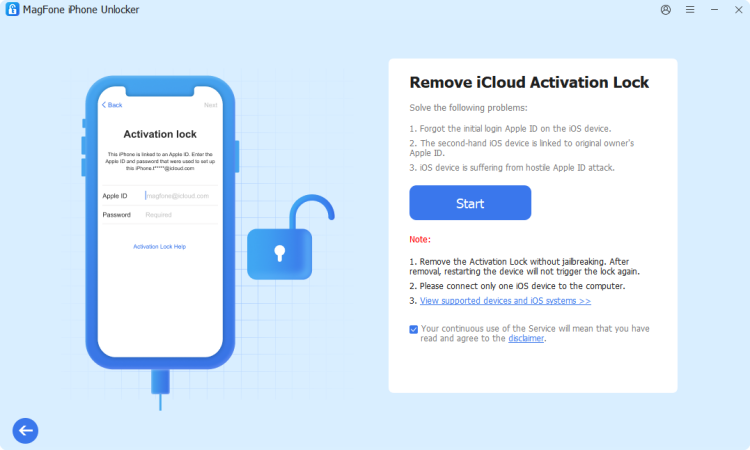
Download MagFone iPhone Unlocker on your computer and open the program. Use a USB cable to connect your iPhone or iPad to the computer. Choose Remove iCloud Activation Lock from the main interface.
Step 2Bypass the iCloud Lock on Device
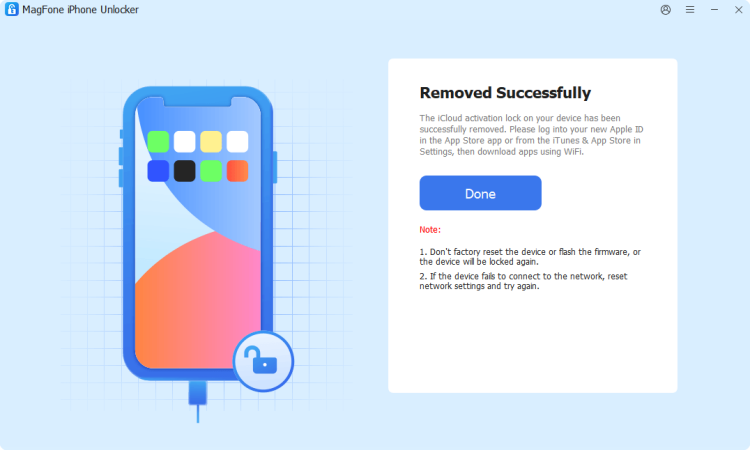
Read and accept the disclaimer before proceeding, then click Start. MagFone iPhone Unlocker will automatically remove the iCloud Activation Lock from your device. After your device restarts, you can unlock it and use it without iCloud Activation Lock.
Part 5. Conclusion
Unlocking an iPhone or iPad can be challenging, but choosing the right tool makes all the difference. iRemove Tools provides a quick fix, but it has limitations, such as the lock returning and iOS limitations. If you're looking for a permanent and cost-effective solution, MagFone is the better choice. It's easier to use, ensures long-term unlocking, and works on more devices.

Dylan Jones
Editor in chief




