








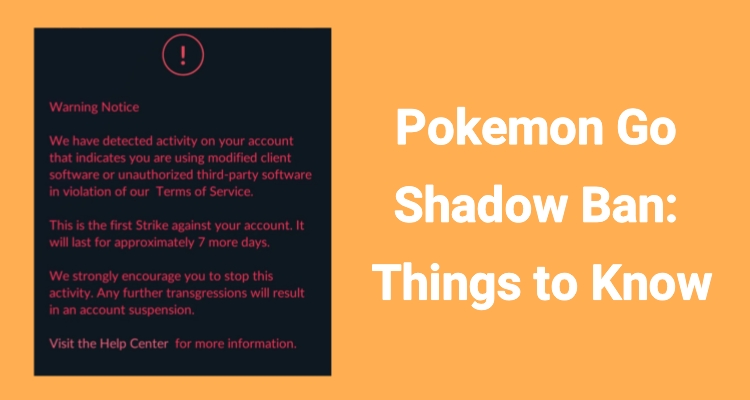
A shadow ban in Pokemon GO can quietly disrupt your gameplay without fully locking you out. You may still log in and explore, but rare Pokemon vanish, features feel limited, and progress slows down noticeably. It can be confusing if you don't know what's happening. In this guide, you'll learn why you're shadow banned according to official rules, along with practical tips to remove and prevent Pokemon GO shadow ban in the future.
- Part 1. What Is a Shadow Ban in Pokemon GO?
- Part 2. How Long do Shadow Bans Last Pokemon GO?
- Part 3. How to Remove Shadow Ban Pokemon GO
- Part 4. How to Avoid a Shadow Ban in Pokemon GO
- Part 5. Conclusion
Part 1. What Is a Shadow Ban in Pokemon GO?
A shadow ban in Pokemon GO is a hidden restriction applied to accounts that appear to violate the game's rules. Instead of blocking access entirely, the system limits gameplay quality. Let's look at what may triggers shadow ban and how to check a shadow ban in Pokemon GO.
01What Triggers Shadow Bans in Pokemon GO?
Several in-game behaviors can lead to a shadow ban if detected by the system as unusual or unfair, like:
Teleporting long distances in a short time.
Moving at unrealistic speeds (faster than driving).
Violating cooldown rules between actions.
Using modified or unofficial game apps.
Logging into the same account across distant locations simultaneously.
Frequent switching between devices or IP addresses.
02How to Check Shadow Bans in Pokemon GO
If you're unsure whether your account is affected, there are a few clear signs you can watch for in gameplay:
Rare or evolved Pokemon stop appearing entirely.
Only common Pokemon spawn repeatedly.
Pokemon flee after a single throw consistently.
Incense or lure modules produce little to no results.
Nearby radar shows limited or basic Pokemon only.
Friends in the same location see different (better) spawns.
Event-exclusive or special Pokemon do not appear.
Part 2. How Long do Shadow Bans Last Pokemon GO?
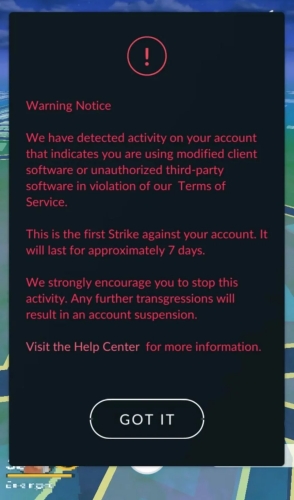
Shadow bans are temporary in most cases, but their duration depends on the severity of the detected behavior and whether it's a repeat offense. The system typically follows a progressive penalty structure, meaning repeated violations can lead to longer or stricter restrictions. Below is the typical Shadow Ban timeline in Pokemon GO, and the exact duration can vary based on account history, frequency of violations, and how quickly behavior is corrected.
1. First Warning:
Duration: Around 7 days
Effect: Warning message appears; gameplay slightly restricted
2. First Shadow Ban:
Duration: 7 to 14 days
Effect: Rare Pokemon disappear, limited encounters
3. Second Shadow Ban:
Duration: Up to 30 days
Effect: Stronger restrictions, longer limitations
4. Severe or Repeated Violations:
Duration: 30+ days or escalation
Effect: May lead to suspension or stricter penalties
5. Permanent Ban:
Duration: Forever
Effect: Account is lost permanently and cannot be recovered
Part 3. How to Remove Shadow Ban Pokemon GO
There isn't a guaranteed instant fix for Pokemon GO shadow ban, but players who recover typically follow these key steps:
Contact Niantic Support: Submit a help request through the official Pokemon GO support form and briefly explain your situation. Even if you don't get a clear response, this creates an appeal record on your account.
Remove Any Third-Party Apps: Uninstall anything that interacts with Pokemon GO outside of the official app, such as an IV checker or automation.
Revoke Account Access: If you used your Google or Pokemon Trainer Club login for outside apps, you should cut off their access: For Google accounts, remove connected third-party permissions in your account security settings. For Pokemon Trainer Club, changing your password helps reset access tokens.
Stop All Related Activity and Wait: After cleaning up your account, the only remaining step is patience. Some trainers report the restriction lifting after about a week (often around 7–8 days), especially after they've removed the offending apps and submitted a support request.
Part 4. How to Avoid a Shadow Ban in Pokemon GO
To avoid a pokemon Go shadow ban in the future, there are several tips you should follow carefully.
01Follow Cooldown Rules
When you move between far locations in Pokemon GO, you must wait before taking in-game actions like catching Pokemon or spinning PokeStops. This waiting time is known as the cooldown period. If you catch a Pokemon in New York and then immediately catch another in Tokyo, Niantic detects this as impossible movement behavior and may flag your account for suspicious activity.
02Avoid Unrealistic Movement Patterns
Rapid or unnatural movement, such as jumping across cities in seconds or moving faster than real transportation allows, can trigger anti-cheat systems. The game analyzes speed and distance patterns to detect inconsistencies. Keeping your movement realistic and gradual helps ensure your activity aligns with normal human travel behavior and avoids detection issues.
03Do Not Share or Switch Accounts Frequently
Logging into the same account from multiple devices or locations in a short period can appear suspicious. Niantic may interpret this as account sharing or automated access. To stay safe, use one device consistently and avoid letting others access your account from different regions or networks.
04Stick to Consistent Gameplay Habits
Sudden changes in gameplay behavior, such as switching locations too often or playing in highly irregular patterns, can raise flags in the system. Maintaining steady, predictable gameplay habits helps your account appear natural. Regular walking, catching, and spinning actions in real areas reduce the chance of triggering automated restrictions.
Sometimes, you may need to travel and cannot avoid frequent location teleportation. Here, MagFone Location Changer comes to help. You can set a route and walking speed in Pokemon Go for your character around the world. By setting a normal-speed route, you can play Pokemon Go anytime and anywhere without getting shadow banned. Thus, the tool helps maintain safe gameplay while staying in active mode in Pokemon Go.

MagFone Location Changer
Easily change your GPS location on iOS and Android devices to anywhere with one click, while not requiring root or jailbreaking!
Step 1 Configure Your Device for Location Control

Begin by downloading and installing MagFone Location Changer on your Windows PC or Mac system. Launch the application and select the Teleport option. Connect your Android or iOS device using a USB cable. Make sure to allow required permissions, such as USB debugging or Location Access, so the tool can modify GPS settings properly and function without interruption.
Step 2 Build and Run a Virtual Movement Route

After setup, tap the second or third tab at the top of the map interface and choose several points to form a custom travel path. You can also adjust the movement speed to mimic real walking behavior. Once ready, press the Start Modifying button to activate the simulation. The software will smoothly move your GPS location along the chosen route, helping keep activity natural and reducing detection risks.
Part 5. Conclusion
A Pokemon GO shadow ban can significantly impact your gameplay without fully blocking access, making it a frustrating experience for many players. Understanding what causes it, how long it lasts, and how to fix it is essential for maintaining your account. By avoiding suspicious behaviors and following fair play practices, you can not only recover from a shadow ban but also reduce the chances of facing one again in the future.

Olivia Wood
Editor in chief





