








In the ever-evolving world of Pokémon GO, trainers are constantly searching for new ways to power up their teams and dominate raids, Gyms, and special events. One of the most exciting battle enhancements introduced in recent updates is the Max Move system. These powerful abilities can significantly boost your Pokémon's combat potential, but many players are still unsure how to unlock and upgrade them properly. This detailed guide will walk you through everything you need to know about Pokémon GO Max Move.
- Part 1. What Is a Max Move in Pokémon GO?
- Part 2. How to Unlock a Max Move in Pokémon GO
- Part 3. How to Level Up a Max Move Pokémon GO
- Part 4. Bonus Tip: Unlock Max Moves Easily in Pokémon GO
- Part 5. FAQs about Unlokcing Pokémon GO Max Move
- Part 6. Conclusion
Part 1. What Is a Max Move in Pokémon GO?
A Max Move is a specialized, high-impact ability exclusive to Pokémon capable of the Dynamax transformation. Unlike standard Fast or Charged Attacks, Max Moves are only accessible during Max Battles at Power Spots. When your Pokémon Dynamaxes, its standard moveset is replaced by a set of three Max Move slots, providing a combination of offensive and supportive capabilities that can turn the tide of a difficult encounter.
01Max Move Types
Max Moves are categorized into three distinct functional roles. Every Dynamax Pokémon comes with a primary offensive move, but you can unlock two additional supportive moves:
1) Max Attack: The primary Max Move is determined by the type of the Pokémon's standard Charged Attack. For example, if your Charizard knows Blast Burn, its primary Max Move will be Max Flare. These deal massive damage and bypass traditional shields more effectively than standard moves.
2) Max Guard: A defensive move that significantly reduces the damage taken from the Power Spot Boss's next attack. It is crucial for survival during high-tier battles where the boss's damage output can quickly deplete your HP.
3) Max Spirit: A supportive move that restores a portion of HP to the user and its allies on the field. In a cooperative Max Battle, timing a Max Spirit can be the difference between a team wipe and a hard-fought victory.
02Max Move Items
Unlocking or enhancing a Pokémon's Max Move requires specific in-game resources, which vary depending on the Pokémon and the level of the move. These materials are often obtained through limited-time events, raid challenges, or special research tasks. Below, we listed the typical costs for most Pokémon, as well as special cases for certain Legendary Pokémon.
| Pokémon | Level-Up Stage | Max Particles / Stardust | Normal Candy | XL Candy |
|---|---|---|---|---|
| Most Pokémon | Locked → Level 1 | 400 MP | 50–80 | / |
| Level 1 → Level 2 | 600 MP | 100–130 | / | |
| Level 2 → Level 3 | 800 MP | / | 40–55 | |
| Eternatus | Locked → Level 1 | 400 MP | 400 | / |
| Level 1 → Level 2 | 600 MP | 1,200 | / | |
| Level 2 → Level 3 | 800 MP | 1,200 | 320 | |
| Zacian & Zamazenta | Locked → Level 1 | 25,000 Stardust | 80 | / |
| Level 1 → Level 2 | 50,000 Stardust | 130 | / | |
| Level 2 → Level 3 | 100,000 Stardust | / | 55 |
Part 2. How to Unlock a Max Move in Pokémon GO
Unlocking a Max Move isn't as simple as teaching a regular Charged Move. It requires meeting specific conditions and completing certain requirements. Below is a step-by-step guide, including a video demonstration and clear written instructions to help you successfully unlock it.
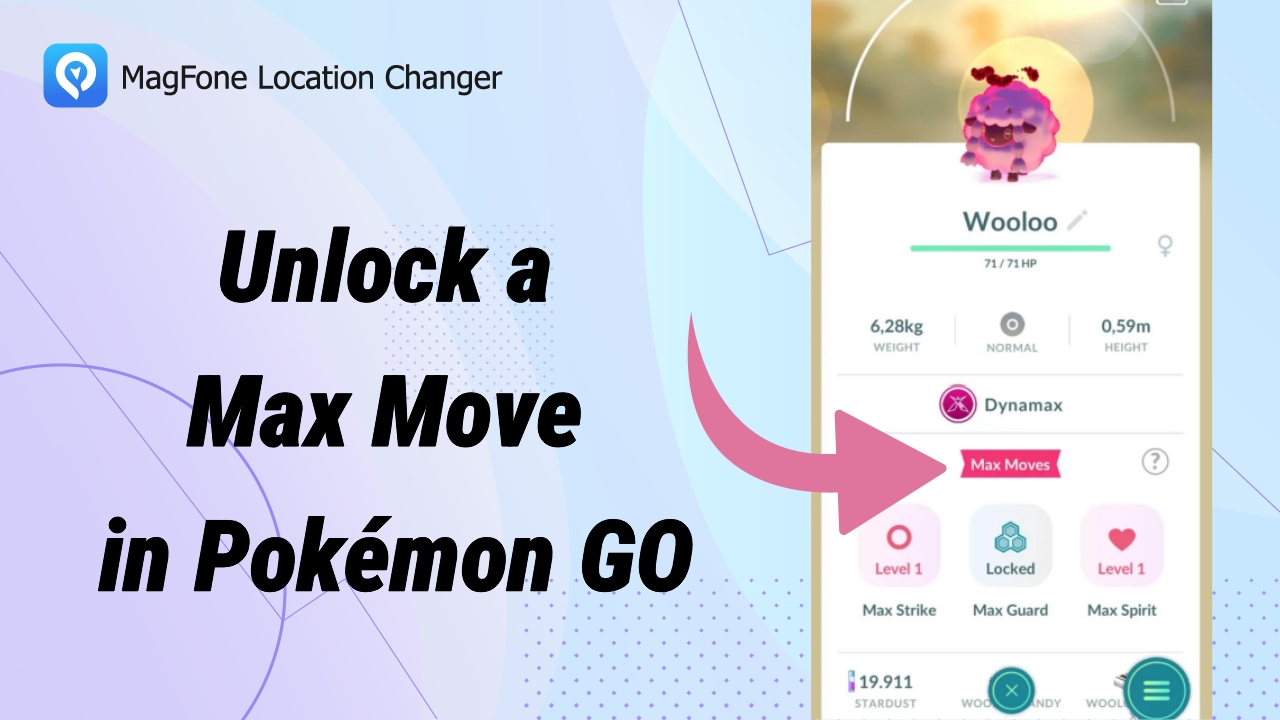
Step 1. Open your Pokémon storage and choose a Pokémon featuring the Dynamax icon (found near its weight and type).
Step 2. Scroll down to the Max Moves section below the standard moveset to view your current ability levels.
Step 3. While the primary attack is usually active, tap on Max Guard or Max Spirit to view the specific unlock requirements.
Step 4. Ensure you have enough Max Particles (from Power Spots or walking) and the necessary Pokémon Candy or Candy XL.
Step 5. Tap the Unlock or Train button. Once the resources are spent, the move is permanently available for use in Max Battles.
Part 3. How to Level Up a Max Move Pokémon GO
Enhancing a Pokémon's Max Move requires Max Particles, Candy, and sometimes XL Candy. These resources are often obtained through raids, events, or research tasks. Using Dynamax Energy lets your Pokémon enter Dynamax form, unlocking powerful Max Moves. Leveling up increases move effectiveness and extends battle duration when Dynamaxed. Here's the steps to level up Max Moves.
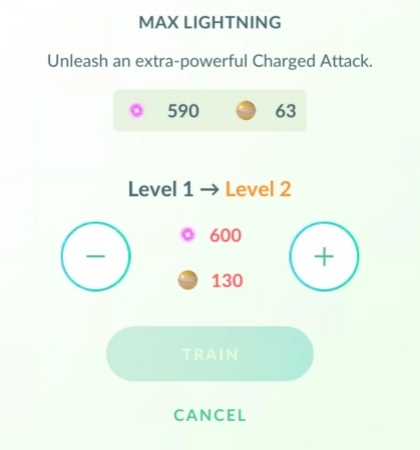
Step 1. Select your Dynamax or Gigantamax Pokémon and open the Max Moves section.
Step 2. Tap the Max Move you want to upgrade. Each move can reach Level 3 (Max Level).
Step 3. Ensure you have the required resources and tap Train to level up the move and boost its effectiveness in battle.
Part 4. Bonus Tip: Unlock Max Moves Easily in Pokémon GO
Unlocking Max Moves often requires participating in raids and events located in high-activity areas. However, not everyone lives near major cities or frequent event hotspots. That's where location tools can make a difference.
MagFone Location Changer helps trainers explore different regions virtually, allowing them to access spawn-dense areas, raid clusters, and event-exclusive zones without physical travel. This flexibility increases the chances of gathering Max-related items faster and completing event tasks more efficiently, making the entire unlocking process smoother and more convenient.

MagFone Location Changer
Easily change your GPS location on iOS and Android devices to anywhere with one click, while not requiring root or jailbreaking!
Step 1 Set Up and Configure MagFone Location Changer

First, download and launch MagFone Location Changer on your computer. Connect your smartphone using a USB cable or a stable Wi-Fi connection. Enable developer options on your device if prompted to allow location adjustments. Once your device is recognized, choose a movement mode that suits the areas you want to virtually explore for Pokémon spawns.
Step 2 Relocate and Participate in Different Events/Raids

Use the app's map or search function to select coordinates for high-activity locations, such as city centers, parks, or event hotspots. Apply the location change, and your Pokémon GO avatar will instantly appear there. This lets you participate in rare raids and event battles, increasing your chances of obtaining Max Move-related items efficiently.
Part 5. FAQs about Unlokcing Pokémon GO Max Move
Are Max Moves permanently unlocked once activated?
In most cases, once unlocked, the Max Move remains tied to that Pokémon permanently. However, special event mechanics may have temporary components. It's best to review event rules carefully.
Why does "Unlock a Max Move" not working?
"Unlock a Max Move" not working could be several reasons:
1) The Pokémon is not eligible.
2) Insufficient resources.
3) Event period has ended.
4) App requires updating.
Ensure your game is updated to the latest version and double-check all unlock requirements.
How do I know if my Pokémon can get a Max Move?
Check the Pokémon's move summary. If a Max Move is available, an unlock option will appear when the Pokémon meets all requirements.
Can I unlock Max Moves in PvP battles?
Currently, Max Moves are primarily designed for raids and PvE content. Some moves may appear in PvP events, but availability can vary depending on the season or event rules.
Are there cooldowns for using Max Moves?
Yes. Max Moves require energy to charge before use, typically taking 10–20 seconds to become ready depending on the move. Some charge faster, others slower but deal more damage.
Part 6. Conclusion
Max Moves add an exciting new strategic layer to Pokémon GO, offering powerful enhancements that can transform battle outcomes. While unlocking them requires effort, resources, and event participation, the payoff is well worth it for dedicated trainers. By understanding eligibility rules, gathering the necessary materials, and leveling wisely, you can build a formidable team ready for any challenge. Stay active, watch for special events, and keep powering up your Pokémon to remain ahead in the game.

Edgar Davis
Editor in chief




