








Ever since its debut, Pokemon GO has transformed our neighborhoods into digital playgrounds. However, many trainers still find themselves in "dead zones" lacking essential landmarks. If you've wondered how to create a PokeStop or Gym in Pokemon GO, you're in the right place. By understanding Niantic's Wayfarer system, you can actively shape your local map, ensuring that your community has plenty of items, spawns, and Raids during your daily walks and adventures.

- Part 1. Can You Create a Pokestop or Gym in Pokemon GO?
- Part 2. How to Create a Pokestop or Gym in Pokemon GO
- Part 3. Extra Tip: How to Unlock More Pokestops and Gyms
- Part 4. FAQs about Pokemon GO Pokestop and Gym
- Part 5. Conclusion
Part 1. Can You Create a Pokestop or Gym in Pokemon GO?
Creating new PokeStops is possible through a few guided steps, but Gyms can't be created manually. Instead, Gyms appear automatically based on PokeStop density. Creating a PokeStop increases item availability through spins and attracts more Pokemon spawns to the area. For rural players, this is a game-changer, turning a quiet street into a bustling community hotspot. Success requires patience and an eye for local culture, but the rewards are permanent. Before you start submitting, you must meet specific criteria set by Niantic:
- Trainer Level: You must be at least Level 37 to submit nominations.
- Safe Access: The location must be accessible to pedestrians without trespassing or entering dangerous areas.
- Distinctiveness: The object should be a unique piece of art, a historical marker, or a local landmark.
- Proximity: New submissions cannot be too close to existing Stops (Niantic uses S2 cells to determine density).
- Ineligible Locations: Private residences, schools (K-12), and emergency services (fire stations/hospitals) are strictly prohibited.
Part 2. How to Create a Pokestop or Gym in Pokemon GO
This section explains how to submit a PokeStop and how new PokeStops or Gyms eventually appear in Pokemon GO.
How to Create a Pokestop in Pokemon GO
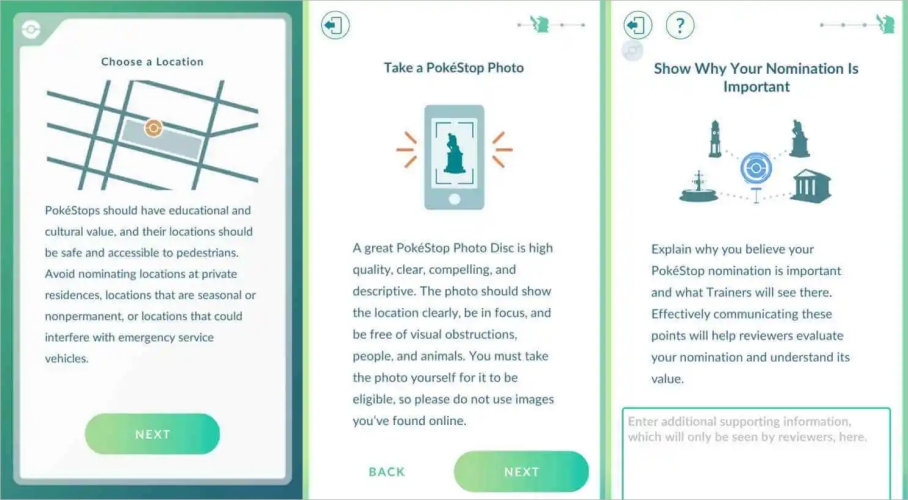
To submit a new Pokestop, you will need to be physically present at the location to take clear photos and provide an accurate description. Below, we provide a visual-ready breakdown and a text guide for creating a PokeStop and a Gym.

Step 1. Open the Main Menu and tap Settings to find the Uploads section.
Step 2. Tap the New PokeStop button to begin the nomination process on-site.
Step 3. Mark the exact location on the map to ensure high GPS accuracy.
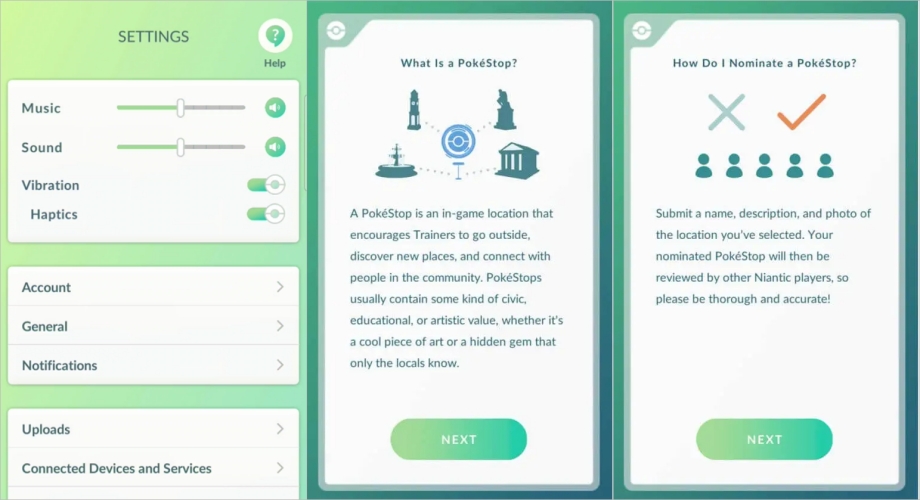
Step 4. Take a clear, high-quality photo of the specific object you are nominating.
Step 5. Capture a surrounding area photo to show safe pedestrian access for reviewers.
Step 6. Write a concise, catchy title and a detailed description of the landmark.
Step 7. Explain to reviewers why this location serves as a great community spot.
Step 8. Submit your nomination and wait for the Wayfarer community to vote.
How Long Does It Take to Get a Pokestop Approved?
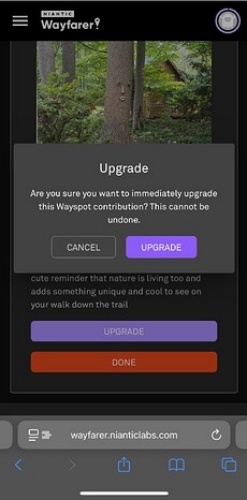
The timeline for approval varies significantly based on your geographic location and the activity level of local Wayfarer reviewers. In densely populated cities with many active reviewers, you might see a response in a few weeks. However, in rural areas or regions with a massive backlog, it can take several months. If you use a "Wayfarer Upgrade" (earned by reviewing other players' submissions), your nomination is fast-tracked, often resulting in a decision within 24 to 72 hours.
How to Get a New Gym in Pokemon GO
Unlike PokeStops, you can't directly apply for a Gym. Gyms are automatically created based on the number of PokeStops within specific areas, using Niantic's S2 cell system. This geographic grid determines location density, meaning that adding new PokeStops can eventually trigger a Gym upgrade once certain numerical thresholds are reached.
| Threshold | Result |
|---|---|
| 2 PokeStops in a Cell | 1 Gym May Appear |
| 6 PokeStops in a Cell | A second Gym May Appear |
| 20 PokeStops in a Cell | A third Gym May Appear |
Part 3. Extra Tip: How to Unlock More Pokestops and Gyms
While creating new locations is the best long-term strategy, the MagFone Location Changer offers an immediate solution for players in item-starved regions. This tool is helpful because it allows you to virtually visit high-density areas like New York without leaving home. By simulating movement, you can spin hundreds of PokeStops and collect Rare Candies or 10km Eggs. Here's how to unlock more Pokestops and Gyms in Pokemon GO.

MagFone Location Changer
Easily change your GPS location on iOS and Android devices to anywhere with one click, while not requiring root or jailbreaking!
Step 1 Link Devices and Launch MagFone

Download and launch MagFone Location Changer on your computer. Connect your iPhone or Android phone using USB or Wi-Fi, ensure Developer Mode is enabled, and select Start from the main page. Then, tap Next and select the Game Mode for the location change.
Step 2 Unlock More In-Game Pokestops

On the interactive map, choose the destination you want to appear at, or enter precise coordinates in the search field. Click Start Modifying, and your device's location will instantly update to the chosen spot, allowing you to access more PokeStops and Gyms as if you were there in person.
Part 4. FAQs about Pokemon GO Pokestop and Gym
Can street signs be PokeStops?
Generally, no. Standard street signs or traffic markers are considered "generic items" and will be rejected. However, if the sign is a unique historical marker, a decorative neighborhood entrance sign, or part of a designated walking trail, it has a much higher chance of being approved by the community.
How to get a PokeStop at your house?
Official rules prohibit PokeStops on private residential property. To get one "at your house," you need a qualifying landmark nearby, such as a community Little Free Library on the sidewalk, or a neighborhood park.
How to turn a Pokestop into a gym?
You cannot manually "choose" to make a Gym. Instead, Gyms are created automatically based on the density of PokeStops within a specific S2 cell. Usually, when a cell reaches its 2nd, 6th, or 20th PokeStop, one of the existing Stops will be upgraded into a Gym based on its popularity/photos.
Part 5. Conclusion
Creating a PokeStop or Gym is a rewarding way to improve Pokemon GO for yourself and your neighbors. By following the criteria and submitting high-quality nominations, you contribute to the game's growth. Whether you are building your local map through Niantic Wayfarer or exploring distant hubs using tools like MagFone, the goal remains the same: catching them all while making the most of your journey.

Edgar Davis
Editor in chief





