








Trading has evolved from a simple "nearby" feature into a complex system that can help you secure high-IV powerhouses, finish your Pokedex, and even bypass heavy candy costs. As of 2026, Niantic has introduced several quality-of-life updates—including the Forever Friend tier and expanded Guaranteed Lucky limits—making it the perfect time to optimize your strategy. This guide covers everything about Pokemon GO Trading to ensure you never waste your hard-earned Stardust.
- Part 1. What Are the Pokemon GO Trading Rules?
- Part 2. How to Trade in Pokemon GO Step-By-Step
- Part 3. Some Great Tips to Trade in Pokemon GO
- Part 4. FAQs about Pokemon GO Trading
- Part 5. Conclusion
Part 1. What Are the Pokemon GO Trading Rules?
Before you start swapping your duplicates for Legendaries, you must understand the "fine print." Pokemon GO trading isn't a free-for-all; it is governed by specific restrictions designed to maintain game balance.
01The Core Requirements
Pokemon GO Trade Level: You must be at least Level 10 to unlock the trading feature.
Pokemon GO Trade Distance: Generally, you must be within 100 meters of your trading partner.
However, 2026 brought a significant update: Forever Friends can now perform one Remote Trade per day regardless of distance. Distance matters more than you think. The amount of candy you receive depends on the distance between the "catch locations" of the two Pokemon.
| Pokemon GO Trade Distance | Candy |
|---|---|
| < 10 km | 1 Candy |
| 10 – 100 km | 2 Candies |
| > 100 km | 3 Candies + 1 Candy XL (for trainers level 31+) |
Pokemon GO Trade Count: Pokemon are limited to a one-way trip; once received in a trade, they are permanently bound to your account and cannot be traded back.
02Standard vs. Special Trades
Standard Trades: Involve Pokemon both players already have in their Pokedex. You can perform up to 100 of these per day.
Special Trades: These are limited to one per day (unless a seasonal event increases the limit). Special trades include:
- Legendary Pokemon and Ultra Beasts.
- Shiny Pokemon.
- Pokemon not currently in your Pokedex.
- New forms (Unown, different Regional forms, or event costumes).
- Purified Pokemon.
03IV Rerolls and Level Caps
When a Pokemon is traded, its Individual Values (IVs)—Attack, Defense, and HP—are completely randomized. This means a "nundo" (0% IV) could become a "hundo" (100% IV), or vice-versa. The minimum IV floor increases with your Friendship Level. For Best Friends, the floor is 5/5/5, while Lucky Trades have a massive floor of 12/12/12.
Part 2. How to Trade in Pokemon GO Step-By-Step
If you're ready to make your first exchange, ensure you are within 100 meters of your friend. If you have reached Forever Friend status, you can initiate a trade from anywhere via the Friend Menu. Now, let's follow these steps to ensure the process goes smoothly.
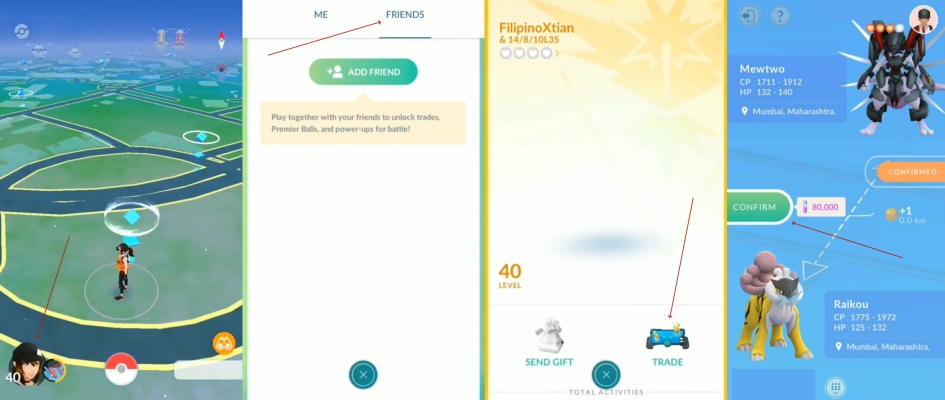
Step 1. In Pokemon GO, tap your Trainer Profile > Friends tab > select the friend you want to trade with.
Step 2. Tap the Trade button. The game will wait for your friend to enter the trading lobby.
Step 3. Browse your storage. The game will highlight how much Stardust is required.
Step 4. Before confirming, the game shows a range of what the new CP and HP might be. Pay close attention to the Stardust cost—if it looks unusually high (e.g., 1,000,000), it means you're attempting an unregistered Special Trade.
Step 5. Once both players hit "Confirm," the animation plays, and the Pokemon are swapped. You will also receive Trade Candy based on the distance between where the two Pokemon were originally caught.
Part 3. Some Great Tips to Trade in Pokemon GO
Mastering the trade system requires more than just meeting friends; it involves strategic planning to maximize rewards and minimize your resource costs.
01Use a Location Changer
Trading is usually restricted by the strict 100-meter Pokemon GO trade distance. If your trading partner is across town or you want to trigger distance-based Candy XL bonuses, a location changer like MagFone Location Changer is the perfect solution. This professional software allows you to switch your GPS coordinates instantly, making trading, catching, and raiding far more convenient without leaving your home. It provides a stable way to bypass physical limitations and optimize your trading experience from anywhere. Here's how to use it.

MagFone Location Changer
Easily change your GPS location in Pokemon GO to anywhere with one click, while not requiring root or jailbreaking!
Step 1 Connect Device and Launch Software

Install MagFone Location Changer on your PC or Mac. Link your smartphone to the computer using a stable USB cable or a shared Wi-Fi connection. Once the software recognizes your device, follow the prompts to enable Developer Mode and choose a specialized location simulation mode.
Step 2 Modify Your GPS Position Instantly

Use the interactive world map to pin a new location or paste specific GPS coordinates into the search box. Once you hit the "Start Modifying" button, your phone's location will instantly update in Pokemon GO, allowing you to enter the trading lobby with friends regardless of your real-world proximity.
02Master the Trade Evolution
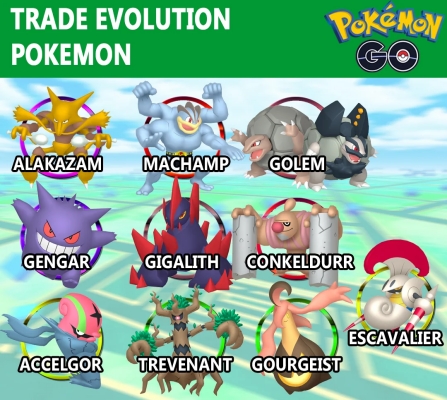
Some Pokemon, such as Machoke, Haunter, Graveler, and Kadabra, have a special "Trade Evolution" mechanic. If you receive one of these in a trade, the candy cost to evolve them to their final form (e.g., Alakazam or Machamp) drops to zero.
Note:
Don't waste 100 candies evolving your own Haunter. Find a friend with the same Pokemon and "mirror trade" them. Both of you will get a free evolution and a chance at better IVs.
03Maximize Guaranteed Lucky Trades
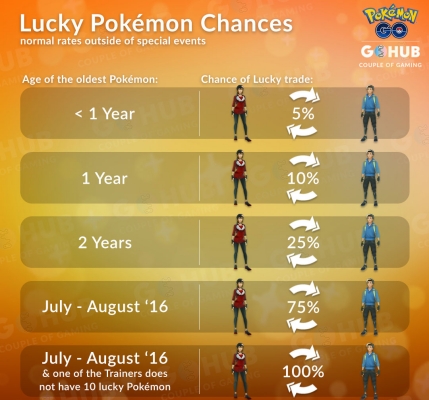
In 2026, the limit for Guaranteed Lucky Trades has been increased to 45. If you (the sender) have fewer than 45 Lucky Pokemon and you trade a Pokemon caught in 2020 or earlier, the trade is guaranteed to be Lucky. And it's noted that Lucky Pokemon require 50% less Stardust to power up.
Note:
Lucky Pokemon always have a minimum IV of 12/12/12. Save your 2020 era Pokemon for "meta-relevant" trades, like Shiny Legendaries, to ensure you get a high-tier attacker for half the price.
04Manage Stardust Costs
Stardust is the "tax" on trading, and it can be expensive. Always aim to reach Best Friend status before trading unregistered Shinies or Legendaries. Waiting 90 days to hit "Best Friend" can save you 960,000 Stardust on a single trade.
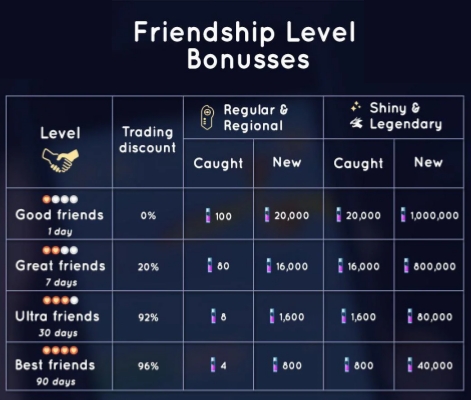
Note:
Time your Special Trades for "Pokemon GO Trade Days" or seasonal events. Niantic frequently hosts events where the Stardust cost for trading is slashed by 50% or more. If you combine "Best Friend" status with an event discount, you can add a new Legendary to your Pokedex for as little as 20,000 Stardust.
Part 4. FAQs about Pokemon GO Trading
Can you trade back Pokemon in Pokemon GO?
No. Once a Pokemon is received in a trade, it can never be traded again. Always ensure you are happy with the exchange before confirming.
Can you trade Legendary Pokemon in Pokemon GO?
Yes, but they are classified as Special Trades, which means you can only complete one per day.
Can you trade Shadow Pokemon in Pokemon GO?
No. Shadow Pokemon cannot be traded in their current state. You must purify them first. Once purified, they can be traded, but they will count as a Special Trade.
Part 5. Conclusion
Mastering the Pokemon GO trading system is the fastest way to turn a mediocre collection into a Master League-ready team. By focusing on Lucky Trades for high-tier attackers and using Trade Evolutions to conserve candy, you can maximize your efficiency.

Olivia Wood
Editor in chief





