








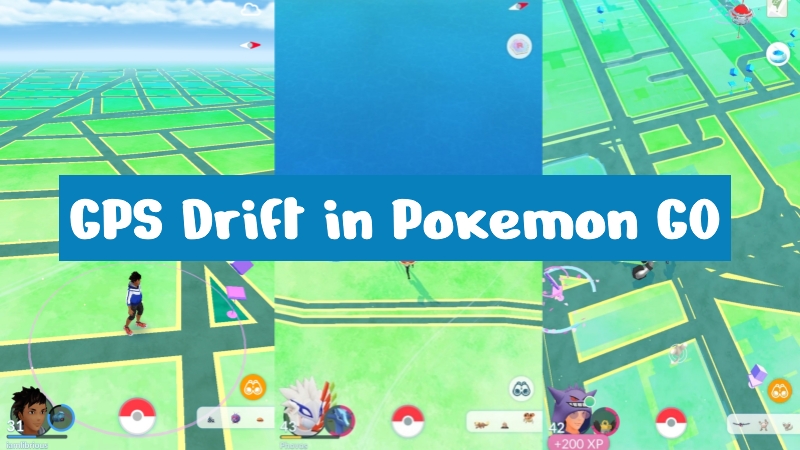
GPS drift in Pokemon GO is a common issue that can unexpectedly move your in-game avatar even when you stay still. While some players use it to gain passive movement benefits, others find it frustrating during normal gameplay. Understanding why GPS drift happens, how to trigger it safely, and how to fix unstable location tracking can help improve your overall Pokemon GO experience on both iOS and Android devices.
- Part 1. What Is GPS Drift in Pokemon GO?
- Part 2. How to Get GPS Drift in Pokemon GO [iOS & Android]
- Part 3. How to Avoid Pokemon GO GPS Drift Ban
- Part 4. How to Fix GPS Drift in Pokemon GO
- Part 5. Conclusion
Part 1. What Is GPS Drift in Pokemon GO?
GPS drift in Pokemon GO is when your in-game character slowly moves or "wanders" even though you are not physically moving. This can make your avatar appear to explore nearby streets, spin PokeStops, or shift positions unexpectedly on the map. Some players try to use it as a passive trick for movement-based gameplay tasks. However, GPS drift can also be a simple location error caused by unstable signals. The main causes include:
Weak GPS signal indoors or in basements.
Tall buildings are blocking satellite accuracy.
Poor Wi-Fi or mobile data connection.
Outdated phone hardware or aging GPS sensors.
Temporary system glitches in location services.
Part 2. How to Get GPS Drift in Pokemon GO [iOS & Android]
Getting GPS drift in Pokemon GO can sometimes benefit players who want passive movement in the game without physically walking. It may help hatch eggs, catch different Pokemon, or reach nearby interaction zones more easily. Many users search how to get GPS drift in Pokemon GO to optimize gameplay efficiency during events or downtime. One great tool for controlled drifting is MagFone Location Changer. This software allows players to simulate movement paths, making Pokemon GO GPS drift possible on both Android and iOS devices. Here's how to drift in Pokemon GO using this tool.

MagFone Location Changer
Easily change your GPS location on iOS and Android devices to anywhere with one click, while not requiring root or jailbreaking!
Step 1 Launch MagFone Location Tool
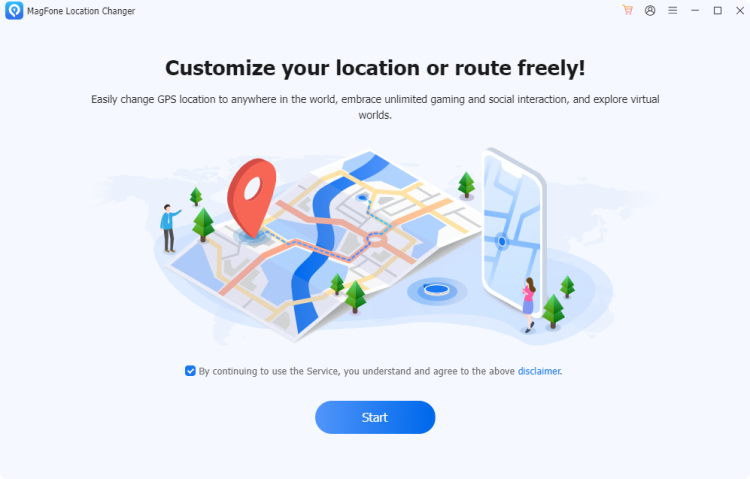
Install and open MagFone Location Changer on your computer. Attach your iPhone or Android phone to the computer with a USB cable. Then click Start and Pokemon GO in game mode to prepare your device for virtual movement.
Step 2 Run GPS Drift in Pokemon GO
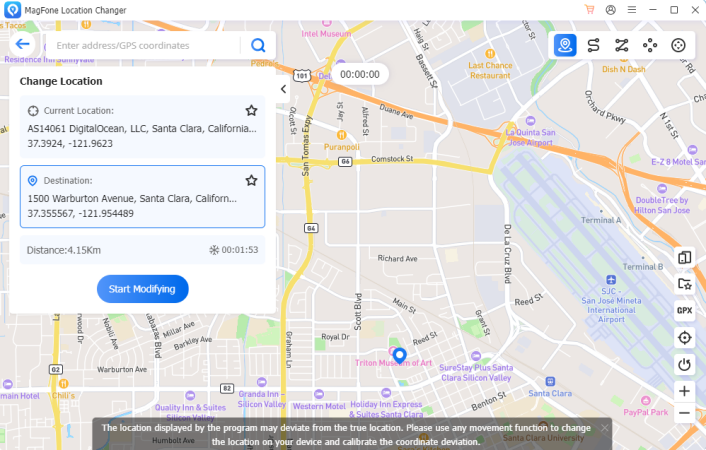
Switch to the route planning tab located in the top-right section. Move across the map and pick multiple points to simulate walking paths. After setting the route, press the Start Modifying button. The system will continuously update your GPS position in Pokemon GO.
Part 3. How to Avoid Pokemon GO GPS Drift Ban
GPS drift in Pokemon GO carries certain risks, but if you follow the rules below, you can greatly reduce the risk and keep your account secure.
Follow Cooldown Rules
Cooldown rules are essential in avoiding detection issues. After significant in-game movement, avoid immediate actions like catching Pokemon or spinning PokeStops. Wait based on travel distance so the game registers behavior as natural. Ignoring cooldown timing is one of the biggest triggers for soft bans related to GPS drift Pokemon GO.
Not Use Abnormal Speed
If your avatar moves too fast compared to human walking or driving speed, the system may flag it as suspicious. Keep movements realistic and steady. Sudden jumps or teleport-like behavior increases risk, especially when using Pokemon GO GPS drift android tools or unstable signals.
Don't Switch Location Fast
Rapidly changing locations across cities or countries can look like spoofing. Even if caused by apps or signal errors, the system may misinterpret it. Maintain gradual transitions and avoid extreme jumps within short time intervals to keep gameplay stable and safe.
Part 4. How to Fix GPS Drift in Pokemon GO
If GPS drift Pokemon GO is affecting your gameplay too often, this section is useful for restoring stable positioning and reducing unwanted movement. These methods help both iOS and Android users improve location accuracy.
Method 1. Reset Location Services
Resetting location services helps clear temporary errors causing inaccurate tracking in Pokemon GO. It refreshes system-level GPS behavior and removes faulty cached positioning data.
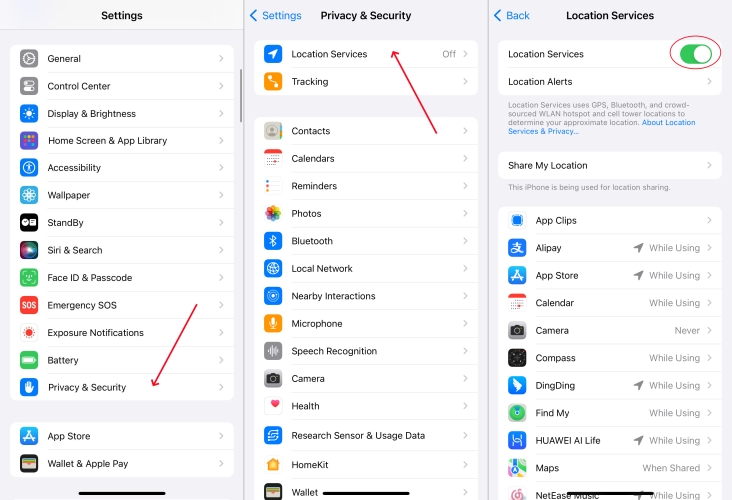
For iOS:
Step 1. Enter Settings and Privacy & Security.
Step 2. Tap Location Services. Then turn off and on the Location Services button.
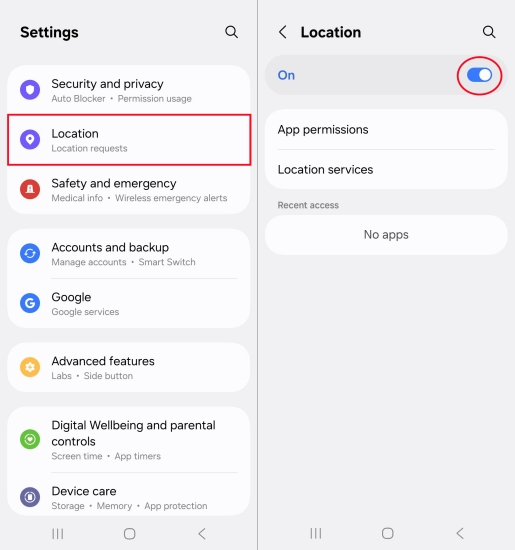
For Android:
Step 1. Enter the Settings app on your Android screen.
Step 2. Find the Location section and toggle it off and on.
Method 2. Enable Precise Location
Another way is to enable precise location. It ensures your phone uses high-accuracy signals instead of approximate positioning. This is especially useful for reducing Pokemon GO GPS drift iOS issues and improving stability in urban environments.
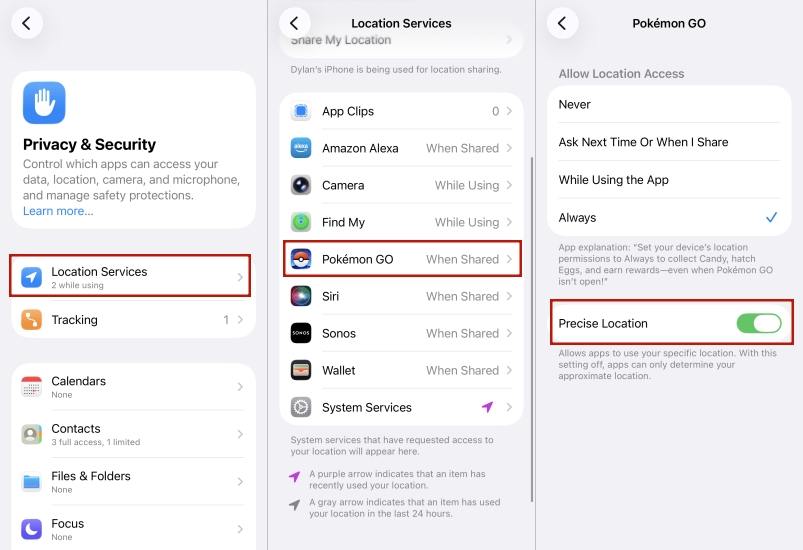
For iOS:
Step 1. In Settings, hit Privacy & Security, then Location Services.
Step 2. Proceed to select the Pokemon GO app from the list.
Step 3. Then switch location to Always and turn on the Precise Location option.
For Android:
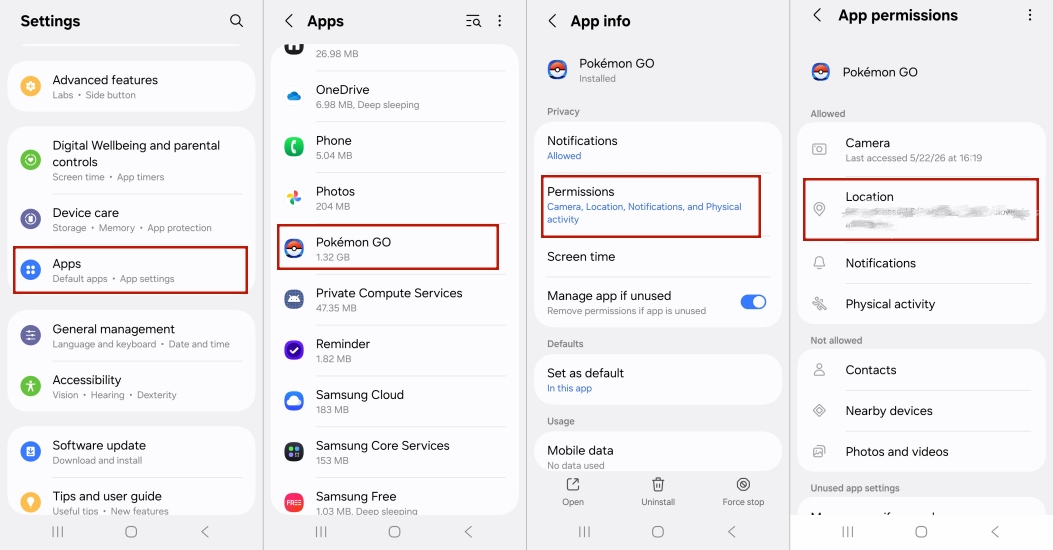
Step 1. In Settings, tap Apps > Pokemon GO.
Step 2. Next, choose the Permissions option and tap the Location section.
Step 3. Select Allow all the time and switch on the Use precise location button.
Method 3. Remove Cached Data
Clearing the cache removes corrupted temporary files that may interfere with GPS accuracy, especially when Pokemon GO GPS drift happens frequently after updates or extended gameplay sessions. On iPhone, you can only offload the app, but on Android, you can clear the cached data manually by following these steps.
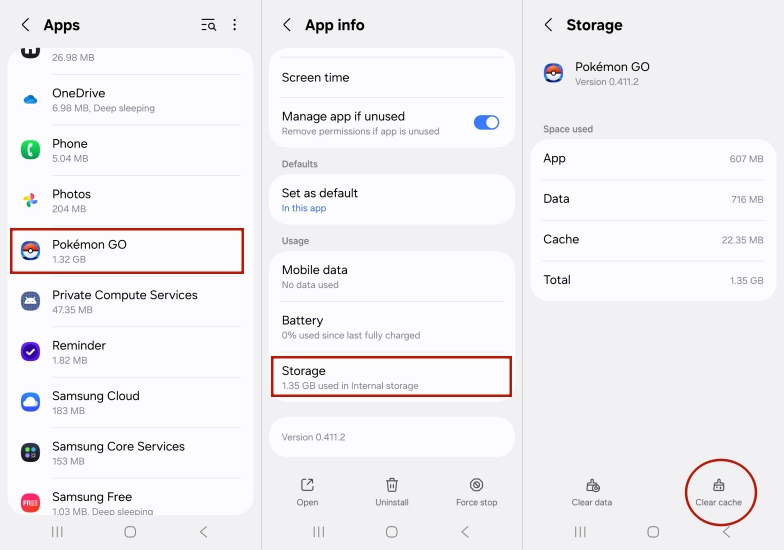
Step 1. Go to Settings and enter the Apps section.
Step 2. Select the Pokemon GO app and scroll down to enter Storage.
Step 3. Press the Clear cache button at the bottom of the screen.
Part 5. Conclusion
GPS drift in Pokemon GO can be both useful and frustrating depending on how it affects gameplay. While some players explore how to get GPS drift in Pokemon GO for convenience, others focus on how to fix GPS drift Pokemon GO to maintain stability. Understanding causes, safe usage, and proper fixes helps improve performance on both Pokemon GO GPS drift android and Pokemon GO GPS drift iOS devices effectively.

Edgar Davis
Editor in chief





