








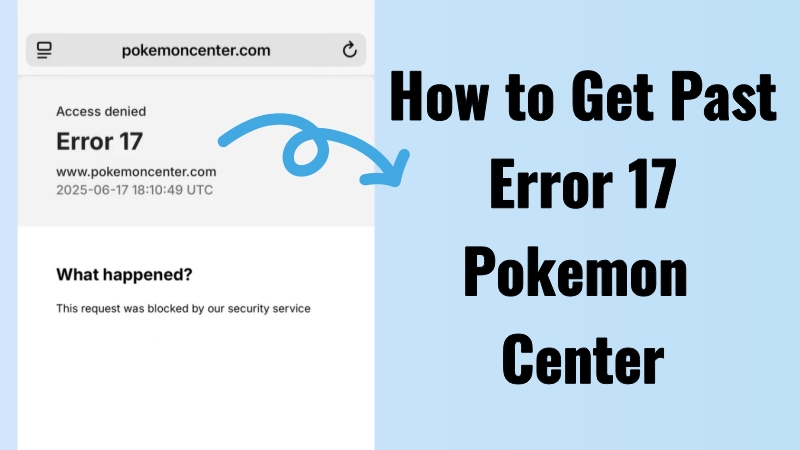
I was surfing Pokemon Center earlier after I got out of queue and maybe because I was clicking too fast or something, I got Error 17 and banned from the site. Is this a permanent ban from Pokemon Center to my IP address? What should I do?"
—— From Reddit
Are you struggling with the frustrating Pokemon Center Error 17 during checkout? This pesky issue often pops up on PC, leaving trainers unable to complete their orders. Many Pokemon fans have been reporting this error for months, making it a common headache. In this guide, we'll walk you through how to get rid of Error 17 in Pokemon Center, so you can enjoy smooth trading and shopping without any interruptions.
- Part 1. How Long Does Error 17 Last Pokemon Center?
- Part 2. Troubleshooting: Pokemon Center Error 17
- Part 3. How to Get Around Error 17 Pokemon Center
- Part 4. Expert Tip: How to Play Pokemon GO with Ease
- Part 5. Conclusion
Part 1. How Long Does Error 17 Last Pokemon Center?
Pokemon Center Error 17 is primarily an anti-bot measure designed to prevent automated clicks and refreshes. It can also appear due to high traffic, suspicious activity, or account-related issues. Thankfully, it's not permanent. The error usually lasts from 30 minutes to several hours, but acting promptly with the right steps can minimize downtime. In the next section, we'll share easy fixes to help you access denied Error 17 Pokemon Center.
Part 2. Troubleshooting: Pokemon Center Error 17
When Error 17 appears in Pokemon Center pages, it signals that adjustments are needed on your device or browser. Several practical methods can help you bypass this error and complete checkout successfully. Let's dive into the solutions and get your Pokemon Center experience back on track.
Check Your Network: A slow or unstable internet connection can trigger Error 17, and Pokemon Center only allows one device to check out on one WiFi during a drop. So, switching the network from WiFi to cellular can get unblocked from Pokemon Center most of the time.
Verify Login Information: Incorrect login details may cause the system to flag your activity. Double-check your username and password before proceeding.
Check Website Status: If the Pokemon Center site is down or overloaded, Error 17 may appear. Switching browsers, like using Chrome instead of Safari, can sometimes resolve this.
Try Different Devices: Besides, using a different device, such as a tablet or another phone, can improve your chances of successfully checking out on Pokemon Center.
Move Slowly on Site To bypass Pokemon Center Error 17, you need to enter all your info manually instead of using autofill. If you click too quickly or do this often, the system may flag you as a bot and block you temporarily. Just pause for a few minutes, then try the checkout again.
Part 3. How to Get Around Error 17 Pokemon Center
If the above steps didn't work, waiting a day before attempting checkout may help. Additionally, there are other methods to bypass Error 17 that can make your shopping experience smoother.
Method 1. Clear Browser Cache
Old cookies and cached data can interfere with the Pokemon Center site. Clearing your browser cache refreshes the system and often resolves Error 17, allowing you to check out without issues.
On iPhone:
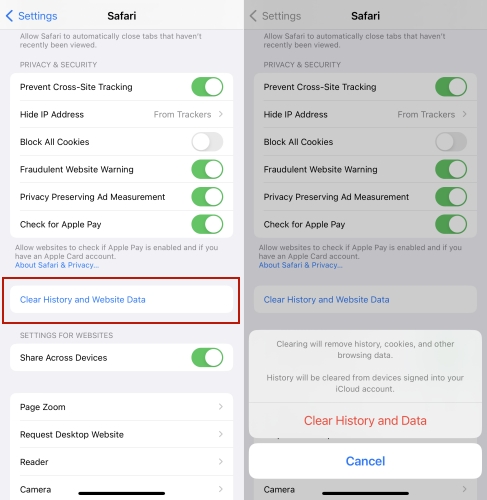
Step 1. Enter Settings. Then tap Apps to find and press your broswer.
Step 2. Tap the Clear History and Website Data option and tap Clear History and Data to confirm.
On PC:
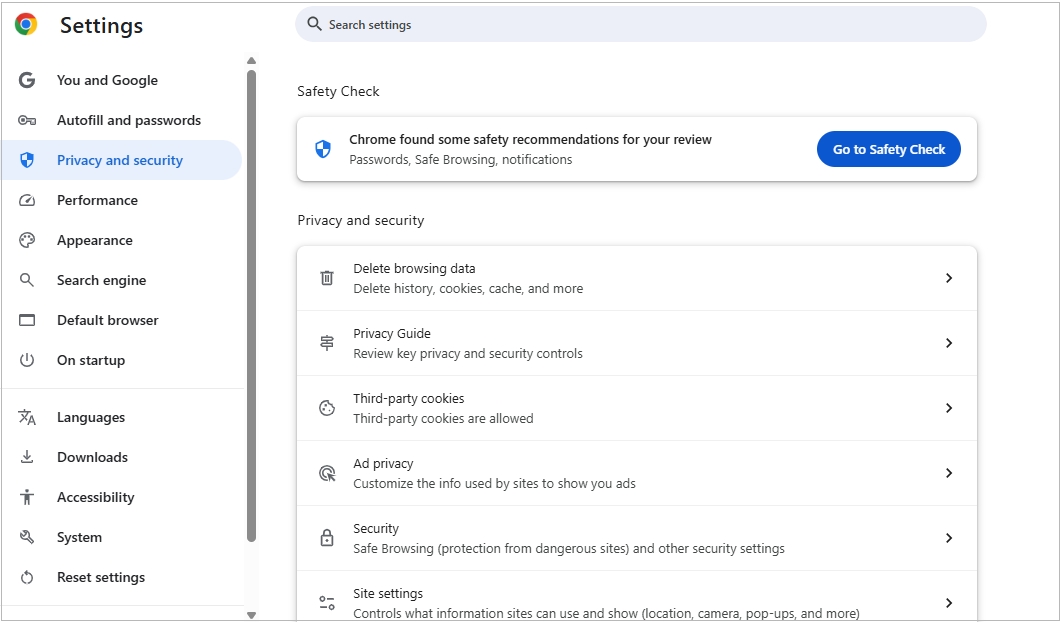
Step 1. Click the three dots on the top right corner of your browser.
Step 2. Choose the Settings option and select Privacy and security in the settings list.
Step 3. After that, click Delete browsing data > Delete Data to clear browser cache and cookies on your pc.
Method 2. Turn Off Your VPN
A VPN can trigger security flags on Pokemon Center. Disabling it ensures your connection looks normal, reducing the chance of encountering Error 17.
On iPhone:
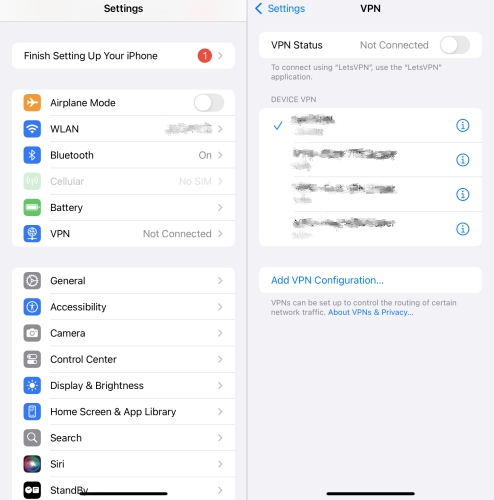
Step 1. Go to Settings.
Step 2. Proceed to enter the VPN section and toggle the VPN Status off.
On PC:
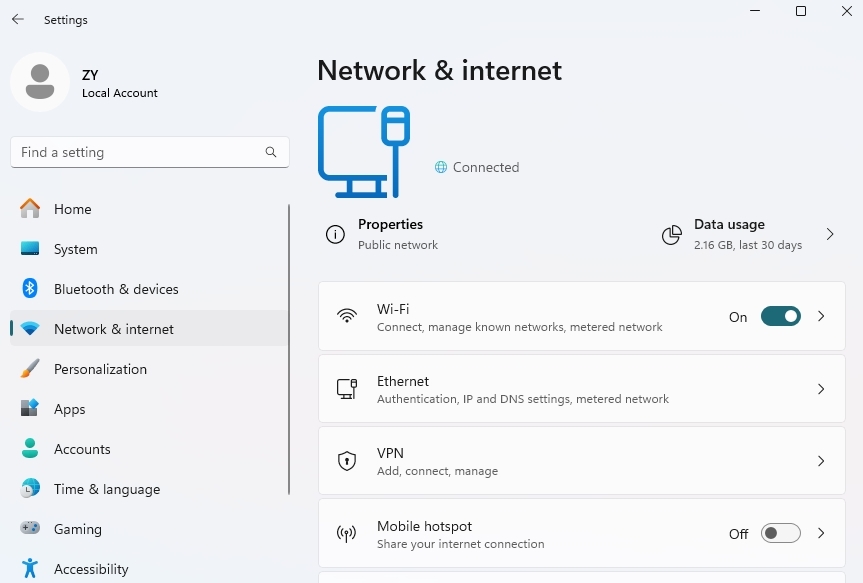
Step 1. Click Start, then Settings. Pick the Network & Internet option.
Step 2. Check and disconnect the VPN from the VPN part.
Method 3. Toggle Airplane Mode
By switching your device to airplane mode, you can reset your IP address, helping to bypass temporary network restrictions causing the error.
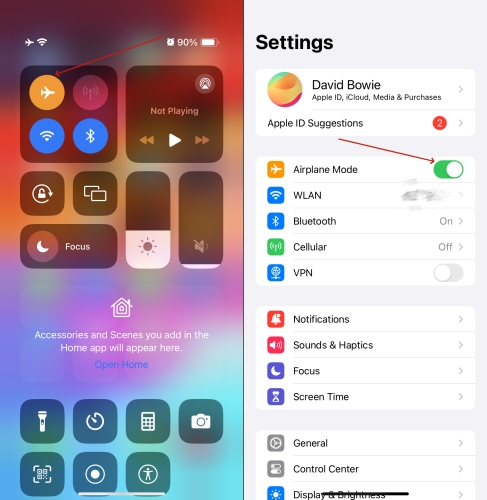
Step 1. Go to Settings.
Step 2. Proceed to enter the VPN section and toggle the VPN Status off.
Method 4. Contact Center Support
If all else fails, reaching out to Pokemon Center support can provide personalized assistance. They can investigate your account and help you resolve the error efficiently.
Part 4. Expert Tip: How to Play Pokemon GO with Ease
If you're a Pokemon GO fan, a location changer tool like MagFone Location Changer can transform your gameplay. This app lets you simulate traveling to different regions, unlocking more PokeStops and rare Pokemon without leaving your home. With a simple one-click setup, you can explore new areas, hatch eggs, and participate in regional events. It's a safe and convenient way to enjoy the full Pokemon GO experience while staying comfortable at home. For trainers wanting variety and efficiency, this tool is a must-have companion. Here's how to use it.

MagFone Location Changer
Easily change your GPS location in Pokemon GO to anywhere with one click, while not requiring root or jailbreaking!
Step 1 Connect Your Device and Launch MagFone

Install and open MagFone on your computer, then connect your phone via USB or Wi-Fi. Enable Developer Mode on your device and select the location-changing feature in the software.
Step 2 Explore Different Regions in Pokemon GO

Pick a spot on the map or enter specific coordinates. Click the "Start" or "Apply" button to instantly update your device's location, letting you explore Pokemon GO in that region without moving physically.
Part 5. Conclusion
Error 17 may feel like a roadblock, but with the right troubleshooting, it's easy to overcome. From checking your network to clearing cache or contacting support, there are multiple ways to resume your Pokemon Center activities. By following these steps, you can avoid delays, enjoy smoother checkouts, and even enhance your Pokemon GO adventures.

Edgar Davis
Editor in chief





