








Pokemon Unbound offers a unique and thrilling twist on the classic Pokemon experience, filled with new stories, characters, and challenges. For many players, Pokemon Unbound codes are a great way to unlock hidden features and speed up progress. Whether you're after rare items or easier battles, understanding how these cheats work can transform your gameplay. This guide will walk you through everything about Pokemon Unbound cheats, ensuring you get the most out of Pokemon Unbound in 2026.

- Part 1. Things to Know about Pokemon Unbound Cheats
- Part 2. Full Pokemon Unbound Cheat Codes List in 2026
- Part 3. How to Use Cheat Codes in Pokemon Unbound
- Part 4. How to Fix Pokemon Unbound Cheats Not Working
- Part 5. Bonus Tip: Best Game Cheat Tool for Pokemon GO
- Part 6. Conclusion
Part 1. Things to Know about Pokemon Unbound Cheats
Pokemon Unbound is a popular fan-made Pokemon ROM hack known for its original storyline, advanced mechanics, and increased difficulty. If you're unsure about using Pokemon Unbound cheats, we'll clarify three common questions you should know before trying them.
What are Pokemon Unbound Cheats used for?
These cheats help players gain advantages such as unlimited candies and money, encounter shiny Pokemon, or obtain different items to overcome challenges, making the game easier to play.
Do Pokemon Unbound Cheats really work?
Yes. While some cheat codes can be buggy or ineffective, most—like the money cheat—work well, saving players from tedious grinding. In the following sections, we list the most updated and useful codes for you to try.
Is it safe to use Pokemon Unbound cheats?
Not always. These cheats should be used with caution, as improper codes may cause game crashes or other issues that disrupt your gameplay.
Part 2. Full Pokemon Unbound Cheat Codes List in 2026
Now that you understand what Pokemon Unbound cheat codes do, it's time to explore the useful codes available. Below is a full, up-to-date list of Pokemon Unbound cheat codes in 2026 that you can use with your emulator to customize and enjoy the game to its fullest.
01Pokemon Unbound Money Cheat
Using this cheat, you can instantly afford healing items, Poke Balls, and other essentials.

02Pokemon Unbound Rare Candy Cheat
With the Rare Candy cheat, you gain instant access to level-up items that dramatically speed up training.
03Pokemon Unbound Master Ball Cheat
This code supplies unlimited Master Balls, allowing you to catch legendary or rare Pokemon without risk.
04Pokemon Unbound Battle Points Cheat
By enabling this cheat, your BP count rises instantly, letting you buy TMs and other rewards without delay.
05Pokemon Unbound Walk Through Walls Cheat
Hidden areas and blocked paths become accessible once this Pokemon Unbound Walk Through Walls cheat is turned on.
06Pokemon Unbound Light Clay Cheat
Light Clay extends the duration of protective moves, and this cheat ensures you never run out.
07Pokemon Unbound Berry Cheats
Rather than farming or waiting for growth, you can stock your bag with healing, status-curing, or battle‑boosting berries immediately.
08Other Pokemon Unbound Cheats
Apart from the common Pokemon Unbound cheats mentioned earlier, there are a few other codes you might want to know. Let's take a look.
| Unlock Items | Cheat Codes |
|---|---|
| Any Item Costs $1 | 3C25A344 FD8F451C / AD86124F 2823D8DA |
| 100% Catch Rate | 87ACF659 707466DC |
| One Hit kills | 95EDFBBA A5A72A78 |
| Encounter Shiny Pokemon | C34A5E26 58D1FACD F935E412 9CD138A2 |
| Fast Egg Hatching | 820285C6 00FE |
| Unlimited PP | 42023C08 6363 00000002 0002 |
| Catch Enemy Trainer's Pokemon | 4D83B1BF E0F5F507 |
Part 3. How to Use Cheat Codes in Pokemon Unbound
You can use cheat codes for Pokemon Unbound on Game Boy Advance emulators like Visual Boy Advance (VBA) or RetroArch. These emulators support popular cheat formats such as CodeBreaker and GameShark. Next, we'll guide you step-by-step on how to enter and activate Pokemon Unbound cheats in the Visual Boy Advance emulator.
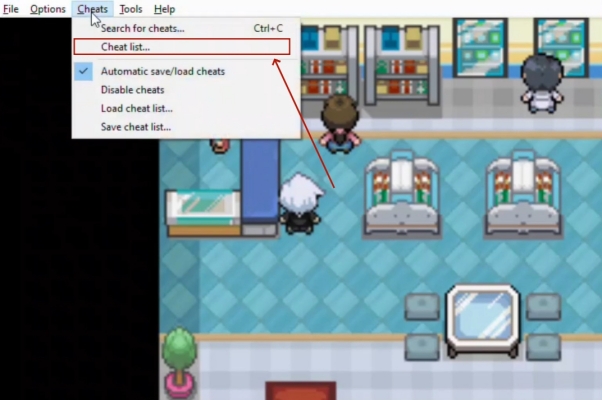
Step 1. Install and run Pokemon Unbound in the Visual Boy Advance emulator.
Step 2. Go on to select the Cheats section and then tap Check list.
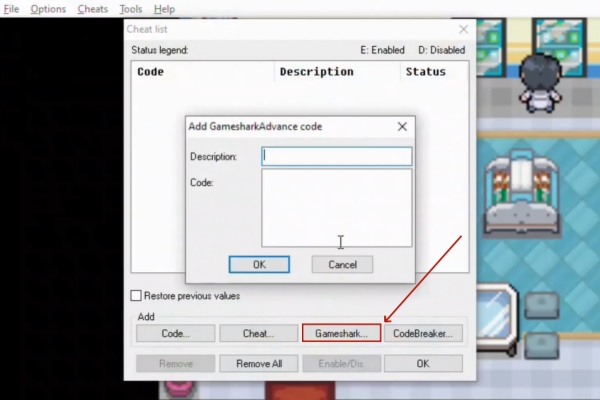
Step 3. From the pop-up window, pick Gameshark to enter the cheat code and code description here.
Step 4. Finally, click OK to save the code, and the code Status should be "E" (Enabled).
Part 4. How to Fix Pokemon Unbound Cheats Not Working
Many players report issues such as cheats not activating, items not appearing, or codes causing crashes in Pokemon Unbound. In some cases, the Pokemon Unbound may take some anti‑cheat measures, which can cause certain codes to stop working. Aside from that, problems like incorrect code entry, incompatible emulator settings, or mismatched ROM versions are fixable. Below are quick fixes to help you resolve the Pokemon Unbound cheats not working issues.
Match cheat type with emulator: Ensure you select CodeBreaker, GameShark, or Action Replay format according to the cheat you're adding.
Use a compatible emulator version: Some outdated emulators block certain codes. Update to VBA‑M or RetroArch for better cheat compatibility.
Avoid enabling conflicting cheats: Running several item cheats at once can overwrite memory addresses, causing crashes.
Confirm ROM version: Cheats are built for specific Pokémon Unbound builds. Using the wrong version can make codes fail.
Check code accuracy: Even one wrong digit or missing line can break a cheat. Recheck codes carefully before applying and saving them.
Test cheats individually: Turn on one cheat at a time to see which ones work properly and isolate any that cause problems or freezes.
Part 5. Bonus Tip: Best Game Cheat Tool for Pokemon GO
Are you also playing Pokemon GO on your device? If yes, here's a great tip for you: MagFone Location Changer. It's a fantastic spoofing tool that lets you teleport your GPS location anywhere in the world. This way, you can explore more areas, access distant PokeStops, join exclusive raids, and catch rare Pokemon easily. Whether you're on Android or iPhone, it works perfectly. With just a few clicks, you can enjoy the unlimited Pokemon GO adventures.

MagFone Location Changer
Easily change your GPS location on iOS and Android devices to anywhere with one click, while not requiring root or jailbreaking!
Step 1 Launch MagFone and Link Your Device

First, install MagFone Location Changer on your computer and open it. Attach your phone via USB or establish a WiFi link. Once MagFone recognizes your device, choose the teleport mode from its dashboard and press the Start button to prepare for instant GPS relocation.
Step 2 Pick a Destination and Activate Teleport

Search for any city, landmark, or coordinate you want to explore in the location input field. Confirm the spot, hit the Start Modifying option, and wait briefly. Your phone's GPS instantly reflects the chosen location, letting you freely enjoy Pokemon GO's events and rewards from that area.
Part 6. Conclusion
Using cheat codes in Pokemon Unbound can dramatically improve your gameplay by giving you access to rare items and shortcuts. Remember to always enter the correct codes and ensure your emulator is compatible to avoid issues. Whether you want to level up quickly or explore secret areas, these cheats help you enjoy the game your way. Have fun, and may your Pokemon journey be legendary.

Olivia Wood
Editor in chief





