








Mastering the Pokémon GO excellent throw is key when completing research tasks, catching rare Pokémon, or increasing catch rates with fewer balls. Players often need to land multiple Excellent Throws in a row during special events, like Research Breakthroughs or Limited-Time Challenges. If you're struggling with this tricky skill, this guide will walk you through everything you need to know to make excellent throws in Pokémon GO.
- Part 1. What Is Pokémon GO Nice/Great/Excellent Throw?
- Part 2. How to Get Excellent Throws in Pokémon GO
- Part 3. Pokémon GO Excellent Throw Hacks and Tips
- Part 4. FAQs about Pokémon GO Throw
- Part 5. Conclusion
Part 1. What Is Pokémon GO Nice/Great/Excellent Throw?
In Pokémon GO, not all throws are the same. You'll come across three main throw types—Nice, Great, and Excellent—based on how precisely you time your Poké Ball release. The better your timing and aim, the better the throw type. Each type offers different bonuses and catch probabilities. While there are more small differences between them, here's a simple table to help you see more clearly the Pokémon GO difference between Excellent, Great, and Nice throws:
| Throw Type | Nice Throw | Great Throw | Excellent Throw |
|---|---|---|---|
| Ring Size | 70% of the Yellow Circle | 30% to 70% of the Yellow Circle | 30% of the Yellow Circle |
| Timing Accuracy | Easiest | Moderate | Hardest |
| XP Bonus | +10 XP | +50 XP | +100 XP |
| Catch Rate Bonus | Low | Medium | High |
Part 2. How to Get Excellent Throws in Pokémon GO
Landing an Excellent Throw not only boosts your chances of catching tough Pokémon but also rewards more XP, which is ideal for leveling up faster. It's often required during Special Research or Timed Challenges. To help you succeed, here's how to make excellent throws in Pokémon GO by mastering timing, ring size, and throw speed.
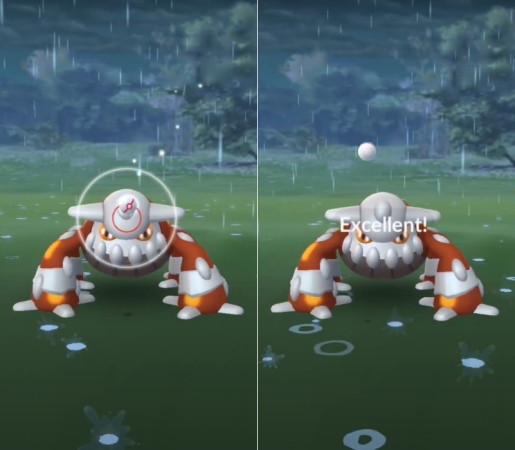
Step 1. Press and hold the Poké Ball until the catch circle shrinks to a small size. Then release your finger without throwing.
Step 2. Wait for the Pokémon to begin its attack or taunt animation.
Step 3. Throw the ball toward the center as the animation begins for the best chance at an excellent throw.
To get excellent throws in a row, find easy targets like Pidgey, Snorlax, or Spinda. Even if you're good at landing Excellent throws, hitting three in a row can still be a little tricky. After reading this part, you can easily get three excellent throws in a row. Completing this challenge not only gives a bonus XP but also helps you finish certain research tasks.
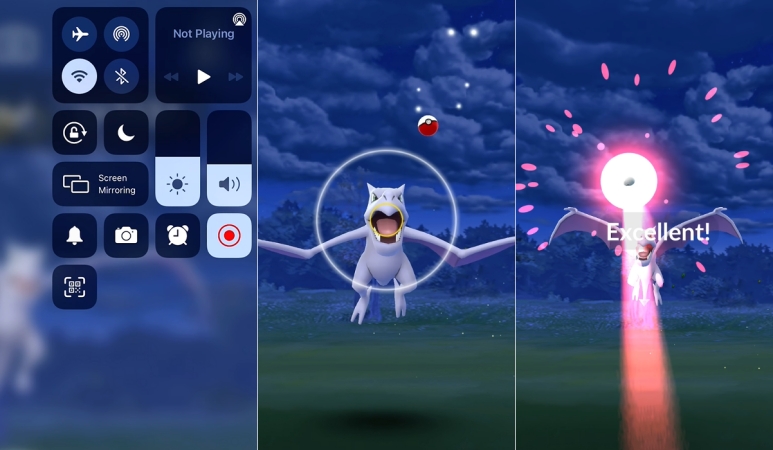
Step 1. Begin by scanning for nearby Pokémon, then go ahead and land your first Excellent throw using the standard method.
Step 2. Next, locate another Pokémon and quickly disable your mobile data before making your throw.
Step 3. If you manage to hit another Excellent throw, simply reactivate your data and allow the game to register it.
Step 4. If you miss the Excellent, exit the app, switch your data back on, and relaunch Pokémon GO for another shot.
Part 3. Pokémon GO Excellent Throw Hacks and Tips
Landing Excellent Throws consistently takes practice, but a few smart techniques can significantly improve your accuracy. By practing with these useful tips, you can better understand Pokémon movement patterns and increase your chances of hitting the Excellent Throw circle more often.
01Practice Throw via MagFone Location Changer
Finding enough Pokémon to practice can be frustrating, especially in rural areas. That's where MagFone Location Changer comes in. This tool lets you teleport your GPS to high-spawn areas like parks or hotspots——without needing to jailbreak your phone. It works in 1-click and simulates natural movement, making it perfect for farming Pokémon, practicing throws, and exploring new regions virtually. You can even customize your route to visit multiple PokéStops, maximizing your catch rate and throw opportunities effortlessly.

MagFone Location Changer
Easily change your GPS location on iOS and Android devices to anywhere with one click, while not requiring root or jailbreaking!
Step 1 Connect Your Device and Launch MagFone
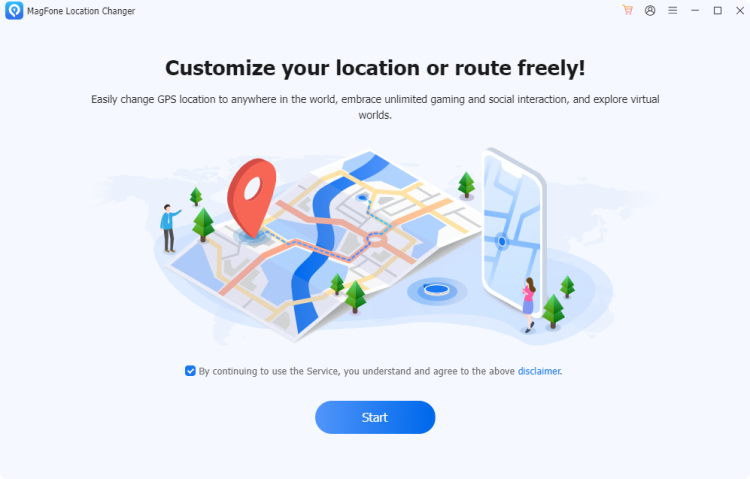
Link both your iPhone or Android and your PC uthrough a USB. Enable Developer Mode on your device if prompted. Then fire up MagFone Location Changer and choose Change Location. Once ready, click Start to begin setting up a virtual location for Pokémon spawn exploration.
Step 2 Teleport to a High-Spawn Area Instantly
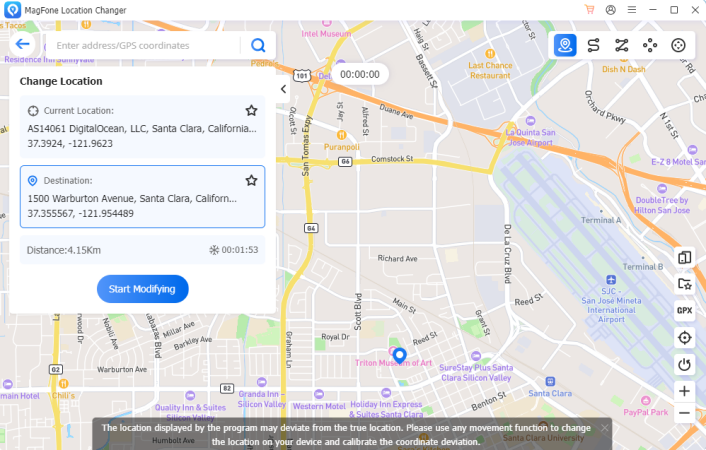
Use the map or search bar to find popular Pokémon hotspots, such as city centers, parks, or special event areas. To change your GPS location in Pokemon, continue to select Start Modifying. This allows you to find and catch more Pokémon in-game, perfect for improving throw accuracy.
02Practice Throw Using Niantic AR+ Mode
Niantic AR+ Mode lets Pokémon appear in your real-world environment, giving you a better sense of distance and positioning. Practicing in AR+ can help you learn how different Pokémon sizes and locations affect throw trajectories, making it easier to judge power and timing for Excellent Throws in regular gameplay.
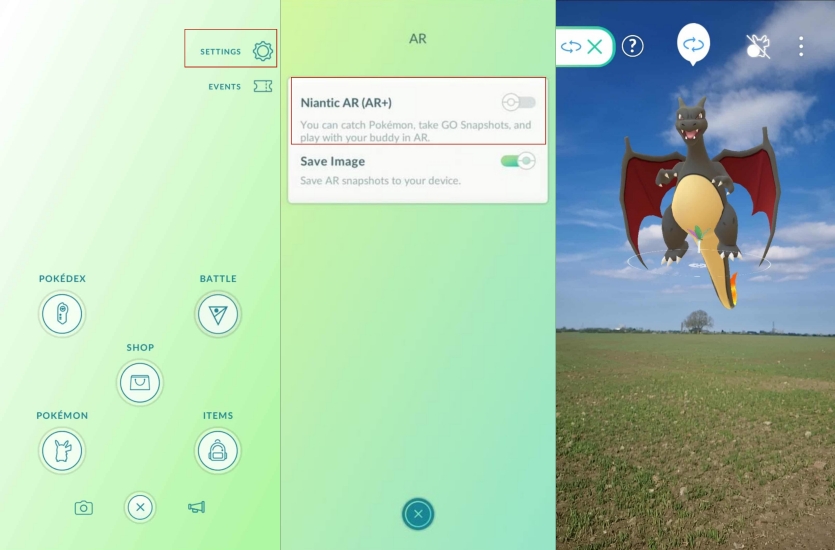
Step 1. Open Pokémon GO and tap the Poké Ball menu.
Step 2. Navigate to Settings and enable Niantic AR+.
Step 3. Start an encounter with any Pokémon.
Step 4. Slowly move your device to allow the Pokémon to appear in the AR environment.
Step 5. Position yourself closer to or farther from the Pokémon to understand how distance affects your throws.
Step 6. Practice curveballs and aim for the smallest catch circle possible before releasing the Poké Ball.
03Practice Throw in AssistiveTouch
AssistiveTouch is an accessibility feature on iPhone that can help some players maintain a more consistent throwing motion. By creating custom gestures and improving finger control, you can develop better muscle memory and throw accuracy over time. While it won't guarantee Excellent Throws, it can be a useful practice tool for refining your technique.
Step 1. Open Settings on your iPhone and go to Accessibility > Touch > AssistiveTouch.
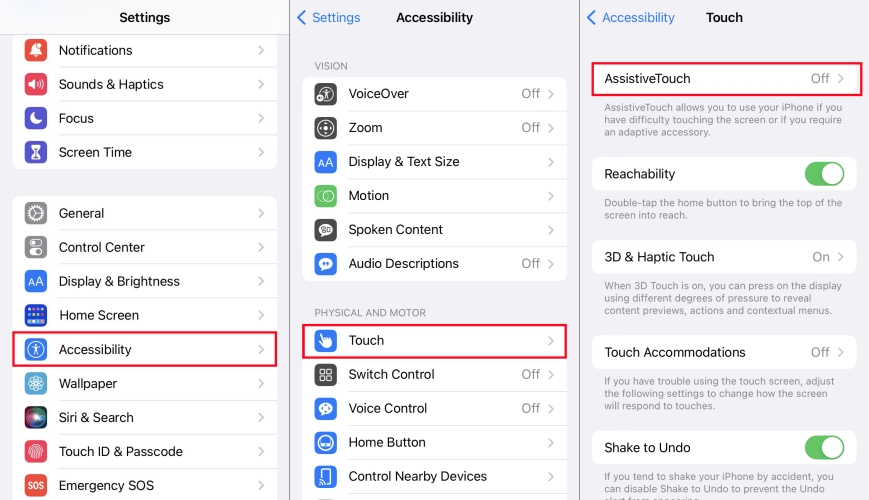
Step 2. Turn on AssistiveTouch and tap Create New Gesture.
Step 3. Draw a swipe gesture that mimics your preferred Pokémon GO throwing motion.
Step 4. Save the custom gesture and give it a recognizable name.
Step 5. Launch Pokémon GO and encounter a Pokémon.
Step 6. Use the custom gesture as a practice aid to improve throw consistency and timing.
Step 7. Repeat the process and adjust the gesture as needed until you find a motion that feels comfortable and accurate.
Other Tips to Get Pokémon GO Excellent Throw:
- Tip 1. Practice on larger Pokémon like Pidgey, Snorlax, or Wailmer to get familiar with throw timing.
- Tip 2. Use Nanab Berries to calm jumpy Pokémon, ensuring a more controlled and accurate throw.
- Tip 3. Curveballs increase your catch rate and help you land Excellent Throws once you've mastered timing.
- Tip 4. Memorize the size of the Excellent circle for different Pokémon through practice to improve accuracy.
Part 4. FAQs about Pokémon GO Throw
How to get a great throw in Pokémon GO?
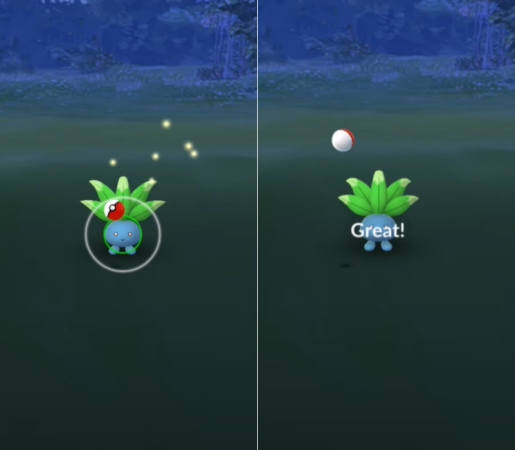
Go for Pokémon with large or medium-sized catch circles like Spheal, Wailmer, or Oddish. They're easier to aim at consistently. Wait until the circle is around the Great size (not too small, not too big), then try to hit near the outer edge of the circle when you throw.
How do you get a nice throw in Pokémon GO?
A Nice Throw requires less precision. Toss the ball when the target ring is at its widest. Straight throws work fine here, especially for large or slow Pokémon like Slugma or Drilbur.
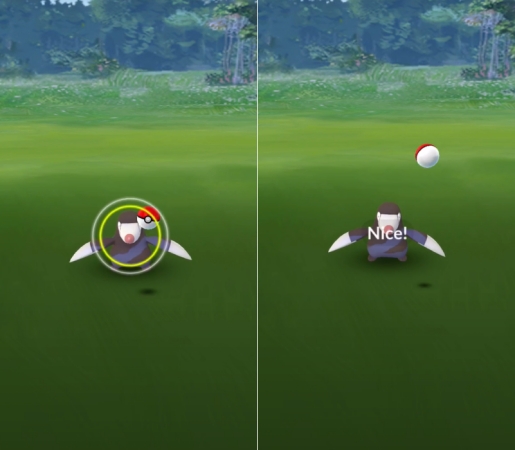
How to throw a curveball in Pokémon GO?
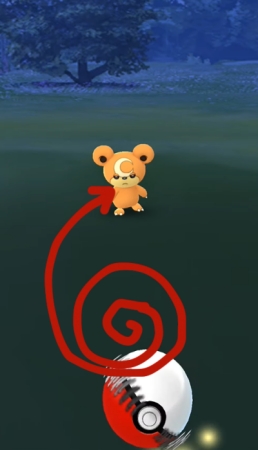
Curveballs increase catch chances and are crucial for Excellent Throws. To throw a curveball in Pokémon GO, rotate the Poké Ball in a circular motion as shown in the picture below. Then release it at a slight curve (left or right) toward the Pokémon, compensating for the spin.
Part 5. Conclusion
Excellent Throws play a key role in boosting catch rates, earning more XP, and completing specific tasks. With some timing, the right targets, and tools like MagFone Location Changer to help practicing, you'll start mastering this skill quickly. Whether you're grinding events or perfecting your technique, you can get what it takes to throw like a pro in Pokémon GO.

Olivia Wood
Editor in chief




