








So last week I learned about the 98-100% thing. Is there a way to tell when you are trying to catch them? Or you only find out after you catch them and appraise them? Also I've see some people post pics with the actual percent, but I don't see it on mine. How do I view the number?
——From Facebook
Two Pokemon can share the same name, the same CP, and the same shiny sparkle, yet perform very differently once a raid boss starts swinging. The difference hides in numbers the game never shows openly. Learning to read them stops you from wasting Stardust on duds and helps you build teams that win. Whether you're chasing a perfect hundo or just curious about your latest catch, this guide shows you how to see IV percentage in Pokemon GO and improve a Pokemon's hidden potential.
- Part 1. Does IV Matter in Pokemon GO?
- Part 2. How to See IV Percentage Pokemon GO
- Part 3. Some Tips to Increase IV in Pokemon GO
- Part 4. How to Get High IV Pokemon in Pokemon GO
- Part 5. Conclusion
Part 1. Does IV Matter in Pokemon GO?
Yes, IVs matter, especially if you battle. IV stands for Individual Values, three hidden numbers attached to every Pokemon you catch: Attack, Defense, and HP (stamina). Each one runs from 0 to 15 and is set when the Pokemon appears. Together they decide how strong it can become when you power it up. During all these, a Pokemon rolled at 15/15/15 is a 100% "hundo."
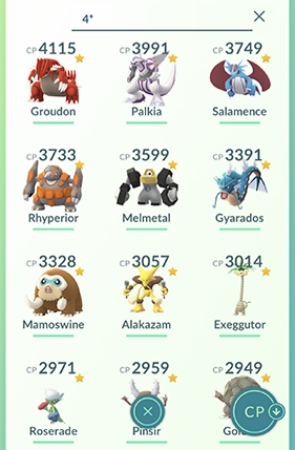
The IV percentage doesn't matter equally everywhere. For raids and gym battles, high Attack and a solid overall spread give you a real edge. For PvP leagues, players often prefer low Attack and high Defense and HP, because that combination fits under the CP caps better. The same Pokemon can therefore be great in one mode and mediocre in another.
You can calculate your IVs, but you can't change the ones a Pokemon already has by simply powering it up. Appraisal tools and calculators will tell you the numbers. The values themselves stay fixed unless you use a game mechanic that rerolls or boosts them, such as trading or purification. Part 3 covers those routes in detail.
Part 2. How to See IV Percentage Pokemon GO
You have three practical ways to check a Pokemon's IV percentage. One is built into the game and needs nothing extra. Another uses outside apps that do the math for you. The last is a simple formula you can work out yourself. Each suits a different kind of player, so pick whichever fits how many Pokemon you need to check.
Method 1. In-game Appraisal
The in-game Appraisal feature is the fastest and easiest way to check Pokemon IVs for free. It displays star ratings and individual stats for Attack, Defense, and HP. Ratings range from zero to three stars. A perfect 100% IV Pokemon earns a special three-star rating with a pink background.
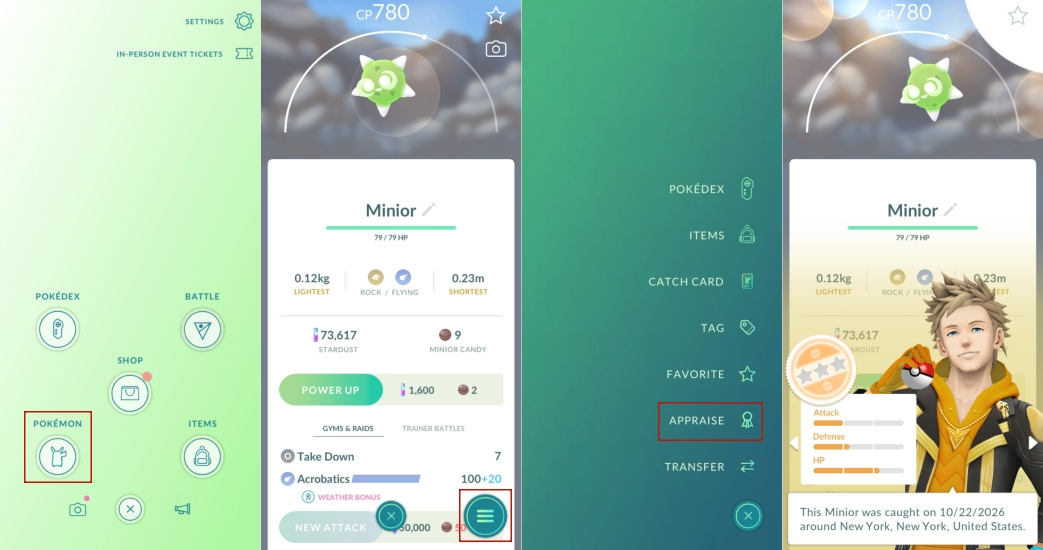
Step 1. Tap the Poke Ball icon at the bottom center of the screen, then select Pokemon to open your collection.
Step 2. Choose the Pokemon you want to inspect.
Step 3. Tap the menu button in the lower corner of the Pokemon's screen.
Step 4. Select Appraise. Your team leader will step in to evaluate the Pokemon.
Step 5. Read the result. The star rating gives you an overall range, and each of the three bars shows one stat out of 15. A full bar means 15, and a top rating means a perfect 100%.
Method 2. IV Calculator Apps
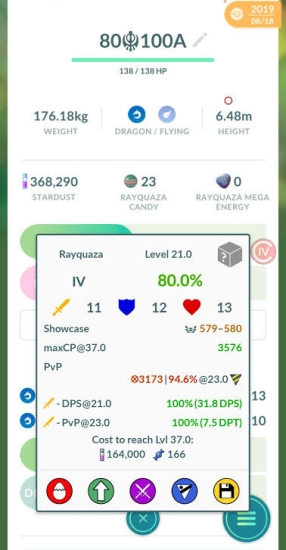
If you have many Pokemon to sort, third-party tools save time. Poke Genie and Calcy IV read a screenshot or live screen capture of your Pokemon and return exact IV figures. Calcy IV also shows move quality and PvP rankings. Browser-based calculators are another route. You enter the species, CP, and the Appraisal bars, and the site narrows the possible IV combinations. These tools are more precise than stars alone.
Method 3. Manual Calculation
You can work out the percentage yourself after appraising. Check the three values, divide by 45, and multiply by 100.
For example, a Pokemon with 15 Attack, 15 Defense, and 14 HP totals 44 (44/45 * 100% = 97.8%).
Part 3. Some Tips to Increase IV in Pokemon GO
Since you can't simply tweak the IVs of a Pokemon you've already caught, improving them usually means obtaining a better version through mechanics the game provides. Below are the most reliable approaches players use to lift their IV floor and push closer to a perfect Pokemon.
Tip 1. Purify Shadow Pokemon
Purifying a Shadow Pokemon raises each of its three IVs by two points. A Shadow Pokemon with strong starting numbers can end up very close to perfect, and a 13/13/13 spread becomes a flawless 15/15/15. Because Shadow Pokemon appear often through Team GO Rocket encounters, this is one of the most dependable ways to build a high-IV roster.
Tip 2. Trade with Friends
Trading rerolls a Pokemon's IVs, but with a guaranteed minimum that depends on how close you are with the other player. Lucky Trades are the strongest option, because they guarantee a floor of 12 in every stat. If you have spare Pokemon with poor stats, trading them away and getting something better in return is a smart way to gamble on a hundo. Keep your best ones, since the reroll can also lower a strong spread.
Tip 3. Use Bottle Caps for Hyper Training
If Hyper Training is available in your version of the game, Gold Bottle Caps boost all three IVs, while Silver Bottle Caps raise a single chosen stat. The Pokemon generally needs a strong friendship level and can't be a Shadow Pokemon or already perfect. Check the in-game requirements before spending rare items, because this feature may differ by region or update.
Part 4. How to Get High IV Pokemon in Pokemon GO
Every catch is a new roll of the dice. Weather boosts, Community Days, and raids raise your encounter rate and the quality of what you find. The more Pokemon you catch, the more likely a high-IV one shows up, so the best strategy is steady volume paired with a quick appraisal after each session. To raise your chances, you can use MagFone Location Changer to teleport to busy spawn areas, where far more Pokemon appear. It can also simulate routes for egg hatching and walking with your buddy. Here is how to set it up on your phone.

MagFone Location Changer
Easily change your GPS location on iOS and Android devices to anywhere with one click, while not requiring root or jailbreaking!
Step 1 Connect Your Device and Launch MagFone

Use a USB cable to link your phone to your computer and switch on Developer Mode. Open MagFone Location Changer, choose the Change Location mode, and click Start.
Step 2 Set a New Location for Pokemon GO
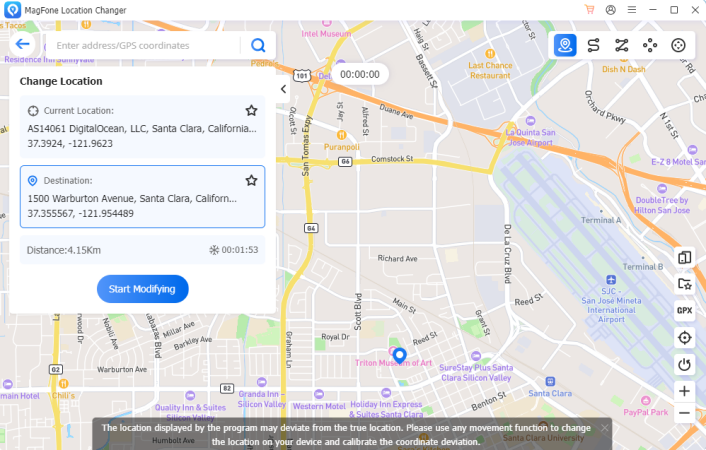
Pick a spot on the map or type an address into the search box to jump straight to it. When you're happy with the destination, click Start Modifying to apply the new location inside the game.
Part 5. Conclusion
Knowing how to read IVs helps you spend Stardust and candy where they count. The in-game Appraisal, calculator apps, and manual math each reveal your Pokemon's potential, while shadow purification, Lucky Trades, and heavy catching push your odds higher. Combine these habits, check your catches regularly, and your raid and battle teams will steadily improve.

Olivia Wood
Editor in chief




